


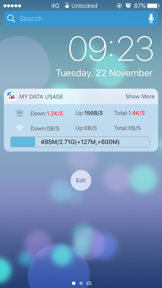

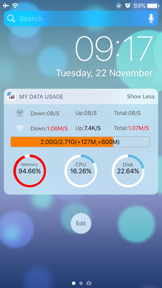


My Data Usage- Cellular Widget is a utility for iOS that monitors real-time cellular, WiFi, and system resource performance via Notification Center widgets.
The App DNA
What makes this app unique?
Users hire this app to avoid data overages and track device health, but the current implementation lacks the predictive intelligence required to compete with modern utility suites.
For iOS users who require granular, real-time monitoring of their device's network data and system resource performance.
What does it look like?
Key features
Displays real-time cellular and WiFi data usage directly in the iOS Notification Center.
Tracks CPU, memory, and disk usage with optional toggle switches for each metric.
How much does it cost?
The app operates as a free utility, likely serving as a cross-promotion surface for the developer's broader portfolio of tools.
Velocity
Dormant developmentopaqueShow more...
The app has been silent for over 17 months, far exceeding the 3-month threshold for a zombie classification. The last recorded update was a minor maintenance release focused on iOS compatibility. There is no evidence of ongoing development, feature iteration, or live operations. The project appears to be in a state of abandonment.
Who built it?
婷婷 乔
13+ apps tracked · Reference
 Voice Box: AI Voice Changer
 Time Caps - A future diary
 中国象棋Simply Chinese Chess
 Msg Viewer Pro
 Tile-Matching
 Photo Widget-Live Pic Sharing
 Followers - Tracker Insight
 网上国网
网上国网 X IPTV Player Pro
 Chinese Chess - China game
 ICN SMARTPASS (인천공항 스마트패스)
 esimSubscription
User Sentiment
What do users think recently?
The recent review mood reads mixed.
How are ratings & reviews evolving?
Not enough recent reviews to extract reliable themes yet.
Read the full review analysisCompetition
Competitive landscape for My Data Usage- Cellular Widget
How's the Reference market?
The app maintains a niche utility position with a 2.78-star rating across 23 reviews. Its lack of predictive analytics compared to Data Usage Pro limits its growth potential in the competitive utility widget space.
Read the market outlookThe rivals identified
By oBytes, LLC
This app is the direct nemesis because it dominates the same utility niche by offering advanced data tracking and predictive analytics that directly compete with our basic monitoring features.
- Offers predictive forecasting to estimate future data usage patterns before the billing cycle ends
- Includes app badge monitoring to provide real-time usage visibility without opening the main application
- Supports custom counters allowing users to track specific data buckets beyond standard cellular and WiFi

Unlock the head-to-head verdict: where this rival wins, and where it loses.
Access the full report for freeThe Analyst's Read
Key takeaways for My Data Usage- Cellular Widget
Where is it heading?
Users report: The utility widget market is consolidating around multi-functional suites, leaving standalone data trackers like this app exposed. Without a pivot to predictive intelligence or a minimalist performance-first strategy, the app will continue to lose ground to more comprehensive competitors.
- The 2.78-star rating indicates that the current feature set fails to meet user expectations for modern utility widgets, leading to churn.
- Users report: Lack of predictive analytics allows competitors like Data Usage Pro to capture the power-user segment, eroding our market position.
The SWOT
- System-level resource monitoring (CPU/Disk) provides a niche utility for power users.
- Notification Center integration offers quick access to real-time data.
- Integrate predictive alerts to neutralize the nemesis's primary feature advantage.
- Refine UI to meet modern iOS design standards.
Next best moves
Ship predictive data alerts because it is the primary differentiator of the nemesis → neutralize competitive disadvantage.
+ 1 more prioritized moveThe counter-intuitive read
The app's lack of complex features is its greatest opportunity…
Read the full takeFeature gaps
Predictive data forecasting (available in Data Usage Pro but missing here) +1
Since the last report: The analysis shifted from a neutral maintenance-mode observation to a declining outlook, highlighting the app's failure to modernize its interface and feature set against multi-functional widget competitors.
Bottom line
My Data Usage- Cellular Widget provides basic system monitoring, but its low rating and lack of predictive features make it vulnerable to modern widget suites, so the PM should pivot toward a minimalist, battery-first positioning while adding predictive alerts to neutralize the nemesis.
Unlock 2 critical frictions, 2 market threats, 1 more prioritized move and the analyst’s take.
Access the full report for freeFAQ
Is My Data Usage- Cellular Widget free to use?
How does this app compare to Data Usage Pro?
Is this app safe for my device's battery?
Sources
- [1] App Store, source
Report last updated