


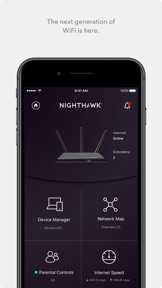


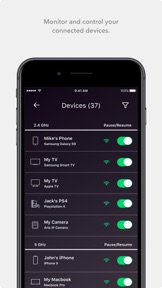


NETGEAR Nighthawk is a utility app for managing home WiFi routers and mobile hotspots on iOS and Android.
The App DNA
What makes this app unique?
Users hire the app to monitor network health and manage security settings, but the mandatory cloud-account requirement creates a barrier to local hardware control.
For Home network users and mobile hotspot owners requiring remote management, security, and global connectivity.
What does it look like?
Key features
Remote monitoring and control of home WiFi network status via cloud-based account connection.
Content filtering and time limits managed through Circle integration.
Cybersecurity monitoring and threat protection for connected devices.
How much does it cost?
Monetization relies on hardware-attached service subscriptions and transaction-based data plan sales.
Velocity
Maintenance developmentperformanceopaqueShow more...
The app currently maintains a cadence of approximately 0.15 releases per week, placing it firmly in the maintenance tier. Development activity is limited to minor bug fixes and generic stability improvements with no evidence of new features or live operations. The release history shows a lack of consistent momentum, with the most recent updates across platforms providing no substantive changes to the user experience.
Who built it?
NETGEAR
3 apps tracked · Utilities
 NETGEAR Orbi - WiFi System App
 NETGEAR Mobile
User Sentiment
What do users think recently?
Review voice lately leans frustrated. Users appreciate signal extension capabilities provide significant coverage improvements for large homes with multiple connected devices and guided setup instructions simplify the initial configuration process for users without technical networking experience, but report mandatory account creation requirements prevent local hardware configuration and frustrate users concerned about data privacy.
How are ratings & reviews evolving?
Weekly average review rating
What users say, by theme
- Signal extension capabilities provide significant coverage improvements for large homes with multiple connected devices
- Guided setup instructions simplify the initial configuration process for users without technical networking experience
- Mandatory account creation requirements prevent local hardware configuration and frustrate users concerned about data privacy
120 of 767 recent reviews analyzed · high confidence · Frustrated overall
Read the full review analysisUnlock 2 more frustration themes and 2 user requests, each backed by review evidence.
Access the full report for freeCompetition
Competitive landscape for NETGEAR Nighthawk - WiFi App
How's the Utilities market?
Nighthawk maintains a high rating of 4.67 on iOS with over 696,000 ratings, yet the Android experience suffers from a 2.2 rating, signaling a critical stability gap in the cross-platform strategy.
The rivals identified

By AT&T Services, Inc.
As a carrier-integrated network management tool, it competes directly for the home WiFi control experience by offering seamless self-setup and parental controls.
- Deep integration with ISP hardware provides superior network health diagnostics and automated troubleshooting capabilities.
- Massive user base allows for rapid deployment of network-wide security updates and feature enhancements.
- Simplified self-setup wizard reduces friction for non-technical users compared to standard router management apps.




Unlock the head-to-head verdict: where this rival wins, and where it loses.
Access the full report for freeThe Analyst's Read
Key takeaways for NETGEAR Nighthawk - WiFi App
Where is it heading?
The casual network management market is consolidating around ISP-integrated tools that offer superior diagnostic visibility. Nighthawk's maintenance-mode updates leave it exposed to churn, so the app must pivot to local-only management to prevent users from migrating to browser-based interfaces.
- Persistent login failures in the latest version erode the daily active habit, which compounds the rating drag already visible on Android.
- Recent expansion into eSIM marketplace functionality demonstrates active feature investment beyond basic maintenance.
The SWOT
- Editors' Choice badge across five markets sustains organic install velocity
- Integration with Circle provides a B2B distribution moat for parental control services
- Local-only management path would reduce account-related churn
- WCAG compliance would capture underserved accessibility-focused user segments
Next best moves
Ship local-only management mode because mandatory account login is the #1 complaint theme → reduce account-related churn
+ 2 more prioritized movesThe counter-intuitive read
The app's reliance on cloud accounts is not just a privacy flaw…
Read the full takeFeature gaps
Real-time topology mapping (available in Domotz Pro but absent here) +1
Since the last report: The app's competitive position has declined due to persistent authentication failures and increased user frustration with subscription prompts, leading to a pivot in development priorities toward stability.
Bottom line
NETGEAR Nighthawk defends its hardware ecosystem through integrated security and parental control services, but mandatory cloud-account friction drives users toward browser-based alternatives, so prioritizing a local-only management path is essential to stabilize the user base.
Unlock 2 critical frictions, 2 market threats, 2 more prioritized moves and the analyst’s take.
Access the full report for freeFAQ
Is the Nighthawk app required to use my NETGEAR router?
Does the Nighthawk app work without an internet connection?
How does Nighthawk compare to ISP-provided apps?
Is the Nighthawk app accessible for visually impaired users?
Sources
Report last updated