


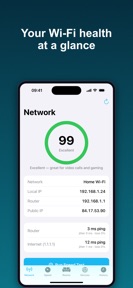


NetPulse: WiFi Analyzer Test is a network diagnostic tool for iOS users that provides speed tests, room-by-room signal measurements, and connected device identification.
The App DNA
What makes this app unique?
The app removes the cognitive cost of interpreting generic network data by providing a human-readable quality score and specific device names.
For Home users and network troubleshooters seeking to identify connectivity bottlenecks and manage connected devices.
What does it look like?
Key features
Manual 10-second spot checks to map signal quality across specific home locations.
Identifies connected hardware with specific names and types rather than generic entries.
Unlimited download, upload, and ping measurements with quality score verdict.
How much does it cost?
Freemium model gates advanced diagnostic depth and historical data behind subscription or one-time purchase.
Velocity
Maintenance developmentopaqueShow more...
The app currently operates on a maintenance cadence, having shipped only a single version since its launch. With no further updates in the last 33 days, there is no evidence of active development or ongoing feature iteration. The release history is limited to the initial build, providing no signal regarding future roadmap or support.
Who built it?
Gennadiy Demchenko
12 apps tracked · Utilities
 Firmar Documentos: Firma PDF
 Tunio – Offline Music Player
 Skillet – Recipe Keeper
 Pure Gin Rummy
 Vaultio – Private Photo Vault
 Sleep Sounds: Rain, Fan, Noise
 Iconic: Icon Pack Maker
 Shiftmate – Shift Planner
 Tapla: Lock Screen Launcher
 Slideshow Maker with Musics!
 Cardkeep: Business Card Scan
User Sentiment
What do users think recently?
How are ratings & reviews evolving?
Not enough recent reviews to extract reliable themes yet.
Read the full review analysisCompetition
Competitive landscape for NetPulse: WiFi Analyzer Test
How's the Utilities market?
Users report: NetPulse: WiFi Analyzer Test occupies a niche in the Utilities category by prioritizing transparency over the fake heatmap features common in rival apps. The current 33-day maintenance gap suggests a lean development cycle that may struggle to defend this position against more active competitors.
Read the market outlookThe rivals identified
Unlock the deeper market read.
Access the full report for freeThe Analyst's Read
Key takeaways for NetPulse: WiFi Analyzer Test
Where is it heading?
Users report: The network utility market is consolidating around apps that offer clear, actionable data rather than deceptive visualizations. NetPulse: WiFi Analyzer Test is currently advantaged by its honest positioning, but the lack of recent updates means it must accelerate its feature roadmap to maintain relevance against more aggressive competitors.
- The 33-day maintenance gap suggests a lean development cycle, which limits the ability to respond to market shifts or competitor feature drops.
- Users report: The commitment to transparency regarding iOS system limitations builds long-term user trust, which is a defensible position against deceptive rivals.
The SWOT
- Manual spot checks provide accurate signal data within iOS system constraints
- Localized pricing could capture high-ARPU markets where rivals charge premiums
Next best moves
Ship social-sharing for measurement results because users value history sharing → increase organic install velocity
+ 1 more prioritized moveThe counter-intuitive read
Users report: The lack of fake heatmaps is a retention lever…
Read the full takeSince the last report: Users report: The app remains in a maintenance-mode state with no functional changes, though the competitive narrative has pivoted to frame the lack of deceptive features as a deliberate trust-building strategy.
Bottom line
NetPulse: WiFi Analyzer Test provides a transparent, ad-free diagnostic tool that respects iOS system constraints, but the 33-day maintenance gap risks ceding the category to more active rivals.
Unlock 1 critical friction, 1 market threat, 1 more prioritized move and the analyst’s take.
Access the full report for freeFAQ
Is NetPulse: WiFi Analyzer Test safe for my home network?
How does NetPulse: WiFi Analyzer Test compare to other Wi-Fi scanners?
Is the free version of NetPulse: WiFi Analyzer Test enough for basic use?
Sources
- [1] App Store, source
Report last updated