


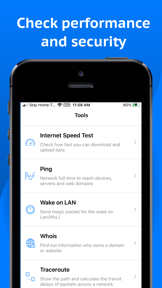
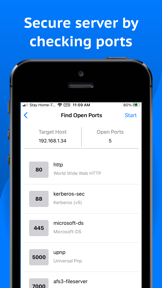
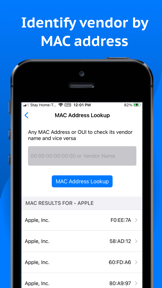


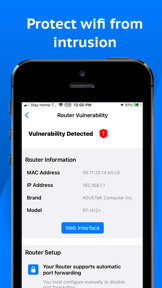


Network Analyzer is a diagnostic utility for home and office network troubleshooting, offering WiFi scanning, speed testing, and security analysis on iOS and Android.
The App DNA
What makes this app unique?
Users hire this app to identify security vulnerabilities and manage local network devices, serving the job of network administration for non-expert users.
For Home and office network administrators and technical users requiring diagnostic tools for connectivity and security troubleshooting.
What does it look like?
Key features
Detects online devices and identifies mDNS, netBIOS, and UPnP names. Revenue link: Core utility drives daily active usage, expanding ad-inventory per session.
Checks router security settings and identifies potential vulnerabilities. Revenue link: Security-focused tool builds category authority and trust, increasing retention for power users.
Sends magic packets to wake up devices on the local network remotely. Revenue link: High-utility feature for professional users, compounding switching costs.
How much does it cost?
Monetization relies on ad-supported free access, with IAP availability indicated in store metadata.
Velocity
Maintenance developmentUX improvementsperformanceShow more...
The app currently ships at a maintenance-level cadence, with the most recent updates across both iOS and Android platforms occurring roughly every three months. While the latest Android release introduced specific tools like DNS speed testing and BLE scanning, the overall development trend remains focused on infrequent, minor stability patches. The publisher utilizes generic release notes for the majority of updates, providing little insight into the long-term roadmap. The app is currently in a maintenance phase, characterized by sporadic feature additions rather than a consistent, high-velocity release cycle.
Who built it?
SETUP TECH
3 apps tracked · Utilities
 MRS - Trading Tools & Analysis
 BUSCAR DRIVER: a relação justa
User Sentiment
What do users think recently?
Review voice lately leans excited. Users appreciate detailed network scanning tools provide actionable insights into router vulnerabilities and hidden device detection and clean interface design allows casual users to navigate complex network diagnostic data without confusion, but report aggressive paywall implementation restricts access to core diagnostic tools immediately after the first launch.
How are ratings & reviews evolving?
What users say, by theme
- Detailed network scanning tools provide actionable insights into router vulnerabilities and hidden device detection
- Clean interface design allows casual users to navigate complex network diagnostic data without confusion
- Responsive developer support builds trust by addressing user inquiries and technical issues quickly
- Aggressive paywall implementation restricts access to core diagnostic tools immediately after the first launch
50 of 50 recent reviews analyzed · high confidence · Excited overall
Read the full review analysisUnlock 2 more frustration themes and 2 user requests, each backed by review evidence.
Access the full report for freeCompetition
Competitive landscape for Network Analyzer: WiFi Scanner
How's the Utilities market?
Network Analyzer maintains a high rating of 4.66 across 575 total ratings. The consistent update cadence of the latest release signals a focus on feature expansion rather than maintenance mode.
Read the market outlookThe rivals identified
Unlock the deeper market read.
Access the full report for freeThe Analyst's Read
Key takeaways for Network Analyzer: WiFi Scanner
Where is it heading?
The market for network utilities is consolidating around tools that offer both speed and security diagnostics. Network Analyzer is well-positioned to capture the power-user segment, but the current technical instability must be resolved to prevent churn among the core user base.
- The latest release added DNS Speed Test and BLE Scanner tools, signaling active feature investment rather than maintenance mode.
- Technical instability (freezing during speed tests) erodes the daily active habit, which compounds the rating drag already visible on Android.
The SWOT
- Security-focused toolset builds category authority and trust
- Multi-platform diagnostic suite ensures consistent utility
- Education partnerships untapped as B2B distribution
Next best moves
Relax paywall gating on basic diagnostic tools because user reviews flag it as a primary churn driver → increase retention
+ 1 more prioritized moveThe counter-intuitive read
The aggressive paywall is not a bug but…
Read the full takeSince the last report: The analyst updated the competitive outlook from maintenance-mode to active feature expansion and re-evaluated the aggressive paywall as a deliberate monetization strategy rather than a strategic error.
Bottom line
Network Analyzer provides a comprehensive diagnostic suite for technical users, but the aggressive paywall implementation at launch creates a barrier that alienates casual users, so the PM should prioritize a more permissive free-tier experience to improve conversion and retention.
Unlock 2 critical frictions, 1 market threat, 1 more prioritized move and the analyst’s take.
Access the full report for freeFAQ
Is Network Analyzer free to use?
Does Network Analyzer work for home WiFi security?
Is Network Analyzer safe for beginners?
Sources
- [1] Play Store listing, source
Report last updated