


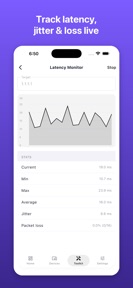
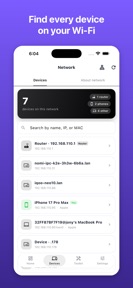


Network Monitor is a diagnostic utility for iOS that identifies connected devices and performs network performance tests.
The App DNA
What makes this app unique?
Users report: Users hire this app to diagnose connectivity issues and verify network security without exposing their local network data to cloud-based scanners.
For Network engineers, IT professionals, and home users needing to diagnose connectivity or security issues.
What does it look like?
Key features
Identifies connected devices on local Wi-Fi by manufacturer and model.
Includes 20+ diagnostic utilities like traceroute, port scanner, and Wake-on-LAN.
Executes all scans and diagnostics locally without cloud data transmission.
How much does it cost?
The app operates on a free model with no ads or tracking, positioning itself as a utility tool rather than a revenue-generating product.
Velocity
Maintenance developmentUX improvementsperformanceShow more...
Network Monitor: WiFi Scanner currently operates at a maintenance cadence, with only one release recorded in the analyzed window. The latest version introduced functional improvements including smarter device discovery and faster scan speeds. Development appears focused on core utility stability rather than frequent feature iteration. Given the current pace of approximately 0.15 releases per week, the app remains in a maintenance state.
Who built it?
JONY DAS
3 apps tracked · Utilities
 Coloring & Paint for Kids
 Toddler Games: Play & Learn
User Sentiment
What do users think recently?
How are ratings & reviews evolving?
Not enough recent reviews to extract reliable themes yet.
Read the full review analysisCompetition
Competitive landscape for Network Monitor: WiFi Scanner
How's the Utilities market?
Network Monitor maintains a niche position as a privacy-focused utility in the Utilities category. The lack of recent user reviews suggests a low-velocity install funnel, which limits the app's visibility compared to high-frequency, ad-supported network tools.
Read the market outlookThe rivals identified
Unlock the deeper market read.
Access the full report for freeThe Analyst's Read
Key takeaways for Network Monitor: WiFi Scanner
Where is it heading?
The network diagnostic market is consolidating around tools that offer both privacy and high-frequency updates. Network Monitor's current trajectory is stable but exposed, as its lack of revenue-generating features may prevent the engineering investment required to keep pace with competitors.
- The 46-day update cadence indicates a maintenance-focused posture, which limits the app's ability to respond to new network security threats or standards.
The SWOT
- On-device processing functions as a privacy-based barrier against cloud-tracking competitors
- 20+ diagnostic utilities provide a comprehensive toolkit for professional network troubleshooting
- Integration of automated network-security alerts could differentiate the app from manual-scan utilities
- Expansion into educational content for home users could broaden the target audience
Next best moves
Accelerate release cadence because the 46-day gap risks falling behind network standards → maintain utility relevance
The counter-intuitive read
The app's lack of monetization is its primary risk…
Read the full takeSince the last report: The analysis shifted from prioritizing monetization to addressing the risks of technical obsolescence and slow release velocity.
Bottom line
Network Monitor succeeds by prioritizing local privacy and a comprehensive toolset, but its maintenance-mode update cadence leaves it vulnerable to faster-moving competitors, so the developer must accelerate the release cycle to maintain relevance against evolving network standards.
Unlock 2 critical frictions, 2 market threats and the analyst’s take.
Access the full report for freeSources
Report last updated