




Network Usage Monitor is a data tracking utility for iOS that provides real-time cellular and Wi-Fi consumption insights via charts and widgets.
The App DNA
What makes this app unique?
Users monitor data cycles to avoid carrier overage charges, a friction point the app removes by providing persistent, at-a-glance visibility on the home screen.
For iPhone users and developers requiring real-time network throughput and historical data consumption insights.
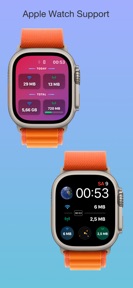
What does it look like?
Key features
Tracks live upload and download throughput for WiFi and cellular connections
Visualizes data consumption trends over hourly, daily, and monthly intervals
Displays network statistics directly on iOS home and lock screens
How much does it cost?
The app is currently offered as a free utility without explicit subscription or IAP gates.
Velocity
Maintenance developmentUX improvementsShow more...
Network Usage Monitor operates on a maintenance cadence, with only one release shipped in the observed window. The latest version focused on UI customization by introducing a new Liquid Glass toolbar for iOS 26. Development appears stable but infrequent, with no evidence of a high-velocity or live-ops strategy. Future updates are expected to follow this sporadic pattern of minor feature additions or interface adjustments.
Who built it?
Khashayar Abryoghani
6 apps tracked · Utilities
 Current Location Data
 BetterCast - Podcast Player
 Brain Reboot – Habit Tracker
 Deluxe Tasbih
 Steps Widgets (Pedometer)
User Sentiment
What do users think recently?
Fresh user feedback skews thrilled. Users appreciate the data monitoring tools provide accurate and helpful insights for managing cellular plan usage limits and widget support allows users to view data usage statistics directly from their home screen interface.
How are ratings & reviews evolving?
What users say, by theme
- The data monitoring tools provide accurate and helpful insights for managing cellular plan usage limits
- Widget support allows users to view data usage statistics directly from their home screen interface
- The application design is lightweight and supports various screen ratios including tablet display formats
- The Apple Watch widget fails to recognize the full version purchase despite successful payment completion
12 of 12 recent reviews analyzed · moderate confidence · Thrilled overall
Read the full review analysisUnlock 2 user requests, each backed by review evidence.
Access the full report for freeCompetition
Competitive landscape for Network Usage Monitor
How's the Utilities market?
Network Usage Monitor maintains a 4.72 rating across 122 total platform ratings. The absence of monetization tiers positions the app as a utility-first tool rather than a commercial competitor in the crowded iOS productivity space.
Read the market outlookThe rivals identified

By Oleh Stasula
Both apps target power users requiring real-time network and system telemetry via home screen widgets. They compete directly for the same audience of users managing data limits and hardware performance.
- Usage Device Monitor provides a 21-widget library for hardware telemetry, while Network Usage Monitor focuses on network data.
- Usage Device Monitor supports cross-platform monitoring between Mac and iOS, unlike the mobile-only Network Usage Monitor.
 My Data Manager VPN SecurityContender
 Traffic Monitor with WidgetContender
 Hotspot Monitor Data UsageContender
 Data RemainingContender
 Network Data Usage TrackerContender
 Data Pill: Data MonitorContender
 BitMeter: Data Usage WidgetContender
 Advanced Data Usage Tracker - smartappContender
Unlock the head-to-head verdict: where this rival wins, and where it loses.
Access the full report for freeThe Analyst's Read
Key takeaways for Network Usage Monitor
Where is it heading?
The market for network utilities is consolidating as system-level tools become more capable, leaving third-party apps to compete on widget design and specialized visualization. Network Usage Monitor is well-positioned to retain its user base if it resolves the current purchase-recognition friction, as its free, ad-free model remains a differentiator against commercial rivals.
- The Apple Watch widget purchase-recognition failure creates a recurring support burden that threatens the app's high rating baseline.
- The latest update (Liquid Glass toolbar) demonstrates active maintenance, ensuring the app remains compatible with the current iOS interface standards.
The SWOT
- Home and lock screen widgets provide persistent data visibility without requiring app launch
- Integrating system shortcuts to automate data toggles would address top user requests
Next best moves
Audit Apple Watch purchase-restore logic because users report widget purchase failures → reduce negative sentiment
The counter-intuitive read
The app's lack of monetization is a competitive advantage…
Read the full takeSince the last report: The app remains in a maintenance state with no material changes to features or pricing. The primary shift involves a more explicit framing of the app's privacy-focused, ad-free utility model against commercial competitors.
Bottom line
Network Usage Monitor provides high utility via persistent widgets, but the purchase-recognition failure on the Apple Watch widget erodes trust in the product's reliability.
Unlock 1 critical friction, 1 market threat and the analyst’s take.
Access the full report for freeFAQ
Is Network Usage Monitor free to use?
Does the app track data usage in real time?
Can I see my data usage on my home screen?
Sources
Report last updated