




OCR Scanner : Image to Text is an iOS utility that converts images and PDFs into editable text via local OCR processing.
The App DNA
What makes this app unique?
The app removes the connectivity dependency required by cloud-based rivals, serving users who prioritize data privacy and offline access for document digitization.
For Students, professionals, and business users requiring quick, offline digitization of printed documents on iOS.
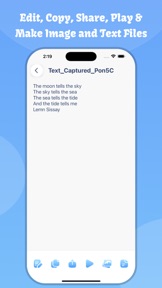
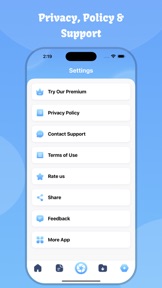
What does it look like?
Key features
Converts images and screenshots into editable text, serving as a core retention loop for productivity workflows.
Extracts text content from PDF files for editing and sharing, serving as a primary utility for document management.
Performs text recognition locally on the device, acting as a differentiator for users prioritizing data security.
How much does it cost?
The app is currently free with no subscription or IAP, which limits long-term revenue potential and prevents the funding of a more aggressive feature roadmap.
Velocity
Maintenance developmentperformanceopaqueShow more...
The app is currently in a maintenance phase, with the latest release occurring 94 days ago. Development activity is limited to minor performance improvements and crash fixes, with no evidence of new features or content updates. The release cadence is infrequent, averaging well beyond the threshold for active development. The publisher provides minimal insight into the technical changes, relying on generic release notes.
Who built it?
Hardik Dhameliya
9 apps tracked · Productivity
 Video Cutter: Trim and Merge
 PDF Compressor: Size Reduce
 Video To Live Wallpapers
 Image Converter: Photo Editor
 ADJ Media Player
 Motion Blur Effect
 Web To PDF : Scanner & Reader
 PDF: Lock & Unlock
User Sentiment
What do users think recently?
How are ratings & reviews evolving?
Not enough recent reviews to extract reliable themes yet.
Read the full review analysisCompetition
Competitive landscape for OCR Scanner : Image to Text
How's the Productivity market?
OCR Scanner : Image to Text occupies a niche as a free, offline-first productivity tool on iOS. With a 4.05-star rating across 19 total reviews, the app lacks the scale to challenge category leaders, and the 94-day update gap signals a lack of competitive pressure.
Read the market outlookThe rivals identified
Unlock the deeper market read.
Access the full report for freeThe Analyst's Read
Key takeaways for OCR Scanner : Image to Text
Where is it heading?
The productivity market is consolidating around apps that offer integrated document ecosystems, leaving standalone OCR tools like OCR Scanner : Image to Text increasingly isolated. Without a shift to a sustainable monetization model or a return to active feature development, the app will likely continue to lose relevance to more comprehensive productivity suites.
- The 94-day update gap indicates a maintenance-only cadence, which signals that the app is not actively competing for market share.
- Lack of monetization tiers prevents the funding of new features, which will likely lead to user churn as competitors iterate faster.
The SWOT
- Offline-first processing ensures privacy and functionality in low-connectivity environments
- Introducing batch processing could capture high-ARPU business users
Next best moves
Introduce a premium tier for batch processing because the current free-only model limits revenue potential → increase ARPU
The counter-intuitive read
The app's lack of cloud features is its primary strength…
Read the full takeSince the last report: The developer has shifted from a passive maintenance posture to an active investment strategy, prioritizing the introduction of a premium tier to address revenue stagnation. This pivot is accompanied by a more critical outlook on the app's competitive viability against integrated productivity suites.
Bottom line
The reliance on a free-only model and a stagnant update cadence leaves OCR Scanner : Image to Text vulnerable to feature-rich competitors. Introducing a premium tier for power users would provide the capital necessary to escape maintenance mode and defend the user base.
Unlock 2 critical frictions, 1 market threat and the analyst’s take.
Access the full report for freeFAQ
Is OCR Scanner : Image to Text free to use?
Does OCR Scanner : Image to Text work without an internet connection?
What are the limitations of the free version?
Sources
- [1] App Store, source
Report last updated