


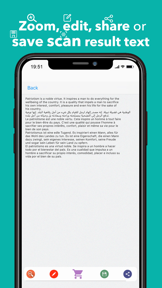

OCR Scanner - Scan PDF & Image is a document digitization tool for iOS that extracts text from images and PDFs using a dual-tier OCR engine.
The App DNA
What makes this app unique?
The app removes the friction of manual data entry for international documents by providing a high-accuracy, multi-language extraction engine that functions as a primary utility for students and professionals.
For Students and professionals requiring document digitization and text extraction from images or PDFs.
What does it look like?
Key features
Text extraction supporting 60+ languages. Revenue Link: Premium-tier gate.
Scanning multiple images in one operation. Revenue Link: Retention loop for power users.
Watching ads to unlock Pro-tier scans. Revenue Link: Ad-inventory monetization.
Local English-only extraction. Revenue Link: Acquisition funnel.
How much does it cost?
The hybrid model captures both low-frequency casual users via credit packs and high-volume professionals via recurring subscriptions.
Velocity
Maintenance developmentperformanceUX improvementsopaqueShow more...
The app currently operates on a maintenance cadence, with the latest release occurring 126 days ago. Development is limited to minor stability and performance improvements, with no evidence of new features or live-service content. The release history shows a single update in the observed window, indicating a lack of active feature development. The publisher relies on generic release notes, providing no insight into specific technical or functional changes.
Who built it?
Inverse AI
13+ apps tracked · Utilities
 Audio Noise Reducer & Recorder
 Compress Image Chitro: KB, MB,
 Video to MP3 Converter Cutter
 Audio Recorder AI Voice Memos
 Image to Text, document & PDF
 Video Converter, Compressor
 Video Background Remover AI
 Video Collage Maker & Editor
 Hearing Aid Sound Amplifier
 Text On Photo
 Video Compressor : Save Space
 Cut, Trim & Crop Video Editor
User Sentiment
What do users think recently?
Review voice lately leans thrilled. Users appreciate high-accuracy text extraction from images provides reliable results for students and professionals alike and generous daily free scan allowance enables casual users to complete necessary tasks without subscription pressure.
How are ratings & reviews evolving?
What users say, by theme
- High-accuracy text extraction from images provides reliable results for students and professionals alike
- Generous daily free scan allowance enables casual users to complete necessary tasks without subscription pressure
- Multi-language support allows international users to extract text from diverse document types effectively
- Aggressive advertising and subscription prompts frustrate users who expect a fully free experience
28 of 28 recent reviews analyzed · moderate confidence · Thrilled overall
Read the full review analysisUnlock 1 more frustration theme and 2 user requests, each backed by review evidence.
Access the full report for freeCompetition
Competitive landscape for OCR Scanner - Scan PDF & Image
How's the Utilities market?
OCR Scanner - Scan PDF & Image maintains a 4.64-star rating across 107 total ratings, positioning itself as a reliable utility in the crowded document-scanning space. The reliance on ad-gating suggests a focus on immediate ad-revenue over long-term subscription conversion.
Read the market outlookThe rivals identified
Unlock the deeper market read.
Access the full report for freeThe Analyst's Read
Key takeaways for OCR Scanner - Scan PDF & Image
Where is it heading?
The document-scanning market is consolidating around apps that offer seamless multi-page workflows, leaving OCR Scanner - Scan PDF & Image exposed due to its single-image limitation. The current maintenance-mode cadence risks losing the casual user base to rivals that prioritize batch-processing efficiency.
- Aggressive ad-gating of core features drives user frustration, which compounds the risk of churn as competitors offer more seamless free-tier experiences.
- The high-accuracy OCR engine provides a defensible core utility that maintains a 4.64-star rating despite the lack of recent feature-heavy updates.
The SWOT
- High-accuracy engine across 60+ languages sustains user trust
- Offline English-only mode removes connectivity barriers for casual acquisition
- One-time purchase option could capture users frustrated by subscription prompts
- QR code scanning integration would increase utility for business-card management
Next best moves
Ship batch processing mode because it is the top-requested user feature → reduce churn for multi-page document users
+ 1 more prioritized moveThe counter-intuitive read
The app's reliance on rewarded video ads is…
Read the full takeSince the last report: The app remains in a maintenance-mode cadence with no functional feature changes. The primary shift involves a strategic re-evaluation of monetization, specifically identifying a one-time purchase option as a potential opportunity to mitigate subscription-related churn.
Bottom line
High-accuracy extraction retains core users, but the aggressive ad-gating of basic features creates a churn risk that limits long-term subscription growth. Prioritizing a smoother free-to-paid transition would unlock higher lifetime value from the existing user base.
Unlock 2 critical frictions, 1 market threat, 1 more prioritized move and the analyst’s take.
Access the full report for freeFAQ
Is OCR Scanner - Scan PDF & Image free to use?
Does the app work without an internet connection?
Can I scan multiple pages at once?
Sources
- [1] App Store, source
Report last updated