



Only Text Editor is a minimalist plain text editor for iOS that focuses on distraction-free writing and custom typography.
The App DNA
What makes this app unique?
Users hire this app to perform quick text edits and code snippets without the interference of formatting menus or markdown complexity.
For Users seeking a minimalist, distraction-free text editor for quick notes and code snippets on iOS.
What does it look like?
Key features
View and edit plain text files without markdown or formatting menus.
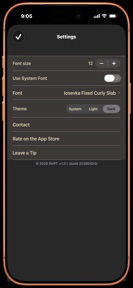
Change default font to custom user-selected fonts, with Iosevka Curly Slab as the default.
Native iOS integration for opening and saving files directly from device or iCloud Drive.
How much does it cost?
The app operates as a free, ad-free utility with no current monetization mechanisms.
Velocity
Maintenance developmentUX improvementsperformanceShow more...
Only Text Editor maintains a low-frequency release cadence, shipping approximately one update every 26 days. Development is currently focused on basic utility improvements and platform integration rather than rapid feature expansion. The latest release represents a minor functional addition, following a period of stability-focused updates. The current pace suggests a maintenance-oriented development cycle.
Who built it?
User Sentiment
What do users think recently?
How are ratings & reviews evolving?
Not enough recent reviews to extract reliable themes yet.
Read the full review analysisCompetition
Competitive landscape for Only Text Editor
How's the Utilities market?
Only Text Editor maintains a niche position in the Utilities category as a free, ad-free tool. Its reliance on native Files app integration provides a stable foundation, though it lacks the competitive scale of multi-platform note-taking suites.
Read the market outlookThe rivals identified
Unlock the deeper market read.
Access the full report for freeThe Analyst's Read
Key takeaways for Only Text Editor
Where is it heading?
The minimalist text-editor market is consolidating around tools that bridge the gap between local files and cloud-sync. Only Text Editor remains stable as a local-only utility, but it risks irrelevance as users increasingly demand seamless access across desktop and mobile environments.
- The latest release added share-sheet integration, confirming the app remains in maintenance mode rather than active expansion.
- Lack of cross-platform synchronization forces users to abandon the app when their workflow expands beyond a single device.
The SWOT
- Custom typography settings differentiate the editor from standard system-font alternatives
- Native Files app integration ensures reliable local and iCloud file management
- Implementing basic cloud-sync would capture users migrating from more complex, bloated note-taking platforms
Next best moves
Ship cloud-sync because it is the primary barrier to multi-device utility → reduce churn to competitors
The counter-intuitive read
The app's lack of features is its primary retention mechanism…
Read the full takeSince the last report: The analysis shifted focus from the app's lack of monetization to its lack of cross-platform synchronization as the primary competitive risk.
Bottom line
Only Text Editor succeeds as a focused, distraction-free utility, because its native Files integration provides a reliable local-first experience, so the developer should prioritize cloud-sync to prevent churn to multi-device competitors.
Unlock 2 critical frictions, 1 market threat and the analyst’s take.
Access the full report for freeSources
Report last updated