






Padme is a utility that turns an iPhone into a wireless, customizable numeric and shortcut keypad for Mac users.
The App DNA
What makes this app unique?
The app removes the cost of purchasing dedicated physical macro hardware by repurposing existing mobile devices for custom input workflows.
For Mac users seeking to extend their hardware with customizable, touch-based input workflows.
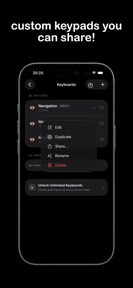
What does it look like?
Key features
Builds custom layouts for shortcuts and navigation, gated by a premium purchase for multiple layouts.
Allows users to export and share configurations, creating a peer-to-peer acquisition loop.
Connects to Mac over local network for input control, establishing core utility.
How much does it cost?
The single-layout cap acts as a functional trial, forcing power users to convert for multi-layout utility.
Velocity
Maintenance developmentperformanceShow more...
With only one release in the observed window and a last update 33 days ago, the development cadence is classified as maintenance. The latest release focused exclusively on resolving issues with hardware buttons, indicating a focus on stability rather than new feature development. There is no evidence of a shift toward live operations or frequent feature iteration. Development appears stable but limited to reactive maintenance.
Who built it?
Giuseppe Bertolini
4 apps tracked · Utilities
 ShortVidsBlocker
 Lightme - Logbook
 Lightme - Lightmeter
User Sentiment
What do users think recently?
How are ratings & reviews evolving?
Not enough recent reviews to extract reliable themes yet.
Read the full review analysisCompetition
Competitive landscape for Padme - Custom keypad for Mac
How's the Utilities market?
Padme occupies a niche in the Utilities category, focusing on hardware-adjacent productivity. The lack of public rating volume indicates a low-visibility profile that relies on organic discovery rather than chart-driven acquisition.
Read the market outlookThe rivals identified
Unlock the deeper market read.
Access the full report for freeThe Analyst's Read
Key takeaways for Padme - Custom keypad for Mac
Where is it heading?
The market for productivity utilities is consolidating around tools that offer deeper integration with professional software. Padme remains in a stable maintenance posture, which leaves it vulnerable to competitors that offer more frequent updates or pre-built templates for specific workflows.
- The current maintenance-mode release cadence indicates a stable product, but limits the ability to capture new market share via feature expansion.
- The peer-to-peer layout sharing mechanism provides a low-cost acquisition channel that does not rely on paid marketing spend.
The SWOT
- iCloud-based sync and backup mechanism ensures layout persistence
- Peer-to-peer layout sharing creates a community-driven acquisition loop
- Wireless local network connectivity removes account-registration friction
- Pre-built layout templates for professional software could drive premium conversion
- Integration with Mac-side automation tools increases value for technical users
Next best moves
Ship pre-built layout templates because the current single-layout cap limits free-tier utility → increase premium conversion
+ 1 more prioritized moveThe counter-intuitive read
The lack of a cloud-based account system is a feature, not a bug…
Read the full takeSince the last report: Strategic prioritization has shifted from general feature development to specific template-driven conversion tactics. The app now explicitly targets professional workflows to mitigate the competitive pressure from physical macro hardware.
Bottom line
Padme provides a functional, low-friction solution for Mac input extension, but the current maintenance-mode cadence risks stagnation against hardware-based alternatives. Prioritizing template-sharing features would leverage the existing peer-to-peer loop to drive growth without requiring heavy feature-set expansion.
Unlock 3 critical frictions, 2 market threats, 1 more prioritized move and the analyst’s take.
Access the full report for freeFAQ
Is Padme suitable for professional video editing?
How does Padme compare to physical macro pads?
Does Padme require an account to connect to my Mac?
Are there free alternatives to Padme?
Sources
- [1] App Store, source
Report last updated