


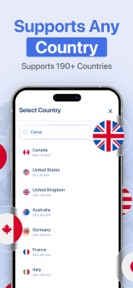


Passport Size Photo Maker is a utility app for iOS that generates compliant passport and ID photos using AI-powered alignment and background removal.
The App DNA
What makes this app unique?
The app removes the time and financial friction of visiting professional photo studios for routine document requirements.
For Individuals requiring compliant passport, visa, or ID photos for travel and official documentation.
What does it look like?
Key features
Automated crop and resize tools ensure photos meet specific biometric standards for passports and visas.
Pre-configured templates for passport and ID requirements across 100+ countries.
Direct printing capability for 4x6 or 5x7 photo paper via AirPrint-supported hardware.
How much does it cost?
The app is currently listed as free with no explicit subscription or IAP gates mentioned in the store metadata.
Velocity
Active developmentopaqueperformanceShow more...
The app maintains an active development pace, shipping two releases within the last week. Despite this frequent update cycle, the developer provides only generic, opaque release notes, making it difficult to discern specific feature additions or technical improvements. This pattern of frequent, non-descriptive updates is often indicative of server-side feature flagging or continuous minor optimization. The current cadence suggests a stable, ongoing commitment to the platform.
Who built it?
Blackcell AI Apps
5 apps tracked · Photo & Video
 2ndCaller: Second Phone Number
 Manga AI: Comic Maker
 MagicSite: AI Website Builder
 AI 3D Model Generator .
User Sentiment
What do users think recently?
How are ratings & reviews evolving?
Not enough recent reviews to extract reliable themes yet.
Read the full review analysisCompetition
Competitive landscape for Passport Size Photo Maker '
How's the Photo & Video market?
Passport Size Photo Maker occupies a niche utility space in the US Photo & Video category. With only 8 total ratings, the app currently lacks the scale to compete with established document-utility leaders.
Read the market outlookThe rivals identified
Unlock the deeper market read.
Access the full report for freeThe Analyst's Read
Key takeaways for Passport Size Photo Maker '
Where is it heading?
The document-utility market is consolidating around services that offer verified compliance rather than simple image formatting. Passport Size Photo Maker must pivot to a monetization model that funds high-accuracy AI features, or it will remain a low-scale utility vulnerable to better-funded entrants.
- The current free-only model provides no revenue to fund the high-accuracy AI updates required for document compliance.
- A limited user base of 8 ratings suggests low discoverability, which hinders the app's ability to compete with established utility leaders.
The SWOT
- AI-powered biometric alignment reduces document rejection risk
- Global template library supports 100+ countries
- AirPrint integration simplifies physical printing workflows
- Introduce paid compliance guarantee services for revenue
- Add premium editing tools to differentiate from basic generators
- Implement referral loops for travel-related services
Next best moves
Implement a premium 'Compliance Review' tier because the current free model lacks revenue levers -> increase ARPU
+ 1 more prioritized moveThe counter-intuitive read
The lack of monetization is a strategic risk, not a growth lever…
Read the full takeSince the last report: The analysis transitioned from a neutral utility assessment to a critical evaluation of the app's lack of monetization and its vulnerability to better-funded competitors. The developer is now advised to prioritize a compliance-verification revenue model to ensure long-term sustainability.
Bottom line
Passport Size Photo Maker provides a functional utility but lacks the monetization or feature depth to defend its position against larger rivals. Introducing a paid compliance verification service would unlock revenue potential and differentiate the app from basic free generators.
Unlock 3 critical frictions, 3 market threats, 1 more prioritized move and the analyst’s take.
Access the full report for freeFAQ
Is Passport Size Photo Maker free to use?
Does this app support passport photos for my country?
Can I print photos directly from the app?
What is the difference between this and a professional photo studio?
Sources
- [1] App Store, source
Report last updated