




Password Generator: Keegen is an offline-first password generation utility for iOS that stores credential history locally.
The App DNA
What makes this app unique?
The app removes the friction of account creation and cloud-sync dependencies for users who prefer a simple, private tool for credential management.
For Privacy-conscious users seeking a simple, offline tool for generating and managing credentials.
What does it look like?
Key features
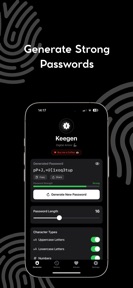
Adjustable character length and symbol inclusion via settings menu.
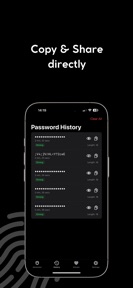
Maintains a list of recently generated passwords stored locally on the device.
In-app purchase mechanism allowing users to provide financial support to the developer without gating core utility.
How much does it cost?
Monetization relies on a voluntary contribution model rather than subscription or ad-based revenue.
Velocity
Dormant developmentShow more...
The app has remained inactive for 399 days, with no updates or feature releases since its initial launch. This lack of development activity indicates a zombie status, as there has been no maintenance or content expansion for over a year. The development pipeline is currently stagnant.
Who built it?
Lorenzo Gioco
3 apps tracked · Utilities
 LactoHero: Lactose Scanner
 JW Habits: Study Tracker
User Sentiment
What do users think recently?
How are ratings & reviews evolving?
Not enough recent reviews to extract reliable themes yet.
Read the full review analysisCompetition
Competitive landscape for Password Generator: Keegen
How's the Utilities market?
Password Generator: Keegen maintains a niche position in the iOS Utilities category as a free, offline-only tool. The lack of updates for over 13 months signals a static market presence compared to active category rivals.
Read the market outlookThe rivals identified
Unlock the deeper market read.
Access the full report for freeThe Analyst's Read
Key takeaways for Password Generator: Keegen
Where is it heading?
The password utility market is consolidating around tools that offer seamless autofill and cloud-based synchronization. Password Generator: Keegen remains a static, privacy-focused alternative that will likely retain its current user base but struggle to gain new ground without a return to active development.
- The 13-month release silence suggests the app is in maintenance mode, which limits the potential for growth against active, feature-rich competitors.
The SWOT
- Local-only storage architecture removes connectivity dependency
- Voluntary tipping model sustains a clean, non-intrusive experience
- Cross-platform expansion could capture users seeking consistent credential generation
Next best moves
Audit the codebase for compatibility with current iOS versions because the app has been silent for 13 months → prevent future platform-driven churn
The counter-intuitive read
The lack of cloud sync is not a…
Read the full takeSince the last report: The app remains in a static, maintenance-only state with no functional or pricing changes. The primary shift is a more precise definition of the app's utility as a credential generator rather than a secure vault.
Bottom line
Password Generator: Keegen's offline-first design serves a specific privacy niche, but the 13-month development gap signals a lack of active investment that leaves the tool vulnerable to feature-rich competitors.
Unlock 2 critical frictions, 1 market threat and the analyst’s take.
Access the full report for freeFAQ
Is Password Generator: Keegen safe for storing passwords?
How does Password Generator: Keegen compare to apps like 1Password?
Is there a free version of Password Generator: Keegen?
Sources
- [1] App Store, source
Report last updated