


PDF Maker - Photos to PDF
By Bharti Verma


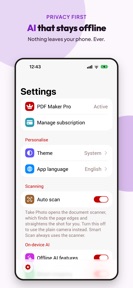


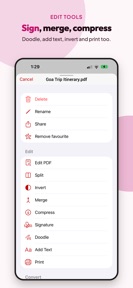

PDF Maker is a productivity tool for iOS that enables users to scan, edit, sign, and secure documents locally on their devices.
The App DNA
What makes this app unique?
Users choose PDF Maker to avoid the privacy risks associated with cloud-based document processing, as all OCR and summarization tasks occur on-device.
For Professionals, students, and individuals requiring secure, offline document management and branded PDF creation.
What does it look like?
Key features
Performs OCR, document summarization, and Q&A locally without cloud data transmission, serving as a brand moat for privacy-first users.
Allows users to design and save personalized PDF layouts with custom fields and branding, gated behind the Pro tier.
Captures physical documents with automatic edge detection and blur warnings, increasing session frequency for document management tasks.
How much does it cost?
The freemium model provides full functional access to the free tier, using ad removal as the primary Pro conversion incentive.
Velocity
Maintenance developmentUX improvementsaccessibilityinternationalizationShow more...
The app currently operates at a maintenance cadence, with only one release recorded in the provided window. The latest version represents a significant overhaul, focusing on UI/UX improvements, accessibility, and internationalization. Given that only a single version has been released in the last 23 days, the development momentum is currently low. Future updates will determine if this redesign marks a shift toward more frequent feature delivery or a return to a slower maintenance cycle.
Who built it?
Bharti Verma
6 apps tracked · Productivity
 Photo Markup - Draw on Photos
 Web2Pics: Full Page Screenshot
 Snap2Text: OCR Text Scanner
 Home Inspector: Property Audit
 Site Report Expert: Punch List
User Sentiment
What do users think recently?
How are ratings & reviews evolving?
Not enough recent reviews to extract reliable themes yet.
Read the full review analysisCompetition
Competitive landscape for PDF Maker - Photos to PDF
How's the Productivity market?
PDF Maker operates in the productivity category, currently focusing on a privacy-first value proposition to differentiate from cloud-heavy rivals. The recent v1.6 rebuild indicates a strategic shift toward feature parity with established document scanners.
Read the market outlookThe rivals identified
Unlock the deeper market read.
Access the full report for freeThe Analyst's Read
Key takeaways for PDF Maker - Photos to PDF
Where is it heading?
The document management market is consolidating around AI-assisted workflows. PDF Maker's pivot to local-first processing provides a unique entry point for privacy-sensitive users, but the app must now prove it can sustain its new release cadence to remain competitive against established, cloud-integrated rivals.
- The recent v1.6 rebuild demonstrates an active development cadence, signaling a shift away from the previous dormant state.
- The focus on on-device intelligence aligns with growing privacy concerns, potentially capturing a niche segment of the document management market.
The SWOT
- On-device OCR processing creates a defensible privacy barrier for sensitive document workflows.
- Custom template builder enables branded output, increasing utility for professional document sets.
- Expanding the template library for specific professional verticals could increase Pro-tier conversion velocity.
Next best moves
Ship cloud-sync options because the lack of multi-device continuity is a barrier for power users → increase retention
+ 1 more prioritized moveThe counter-intuitive read
The offline-first design is not just a privacy feature…
Read the full takeBottom line
PDF Maker's shift to on-device intelligence provides a clear privacy-first differentiator, but the lack of cloud-sync limits its utility for professional power users. Prioritizing multi-device continuity would unlock higher retention for the professional segment, moving the app beyond a simple scanning tool.
Unlock 1 critical friction, 1 market threat, 1 more prioritized move and the analyst’s take.
Access the full report for freeFAQ
Is PDF Maker safe for sensitive documents?
How does PDF Maker compare to cloud-based scanners?
Is the Pro version worth it for casual users?
What are the alternatives to PDF Maker?
Sources
- [1] App Store listing
Report last updated