


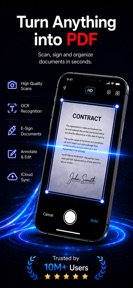
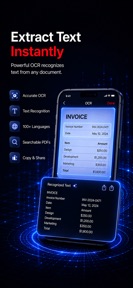


PDF Scanner: OCR & Sign Docs is a mobile document scanner and PDF manager for iOS that enables camera-based capture, OCR text extraction, and digital signing.
The App DNA
What makes this app unique?
The app removes the friction of manual paperwork by converting physical documents into searchable, signed digital files that sync via iCloud.
For Business professionals, students, and freelancers requiring digitized, searchable, and signed document archives.
What does it look like?
Key features
Camera-based capture with automatic edge detection and smart cropping.
Premium-tier gate for converting images into searchable, editable text.
Premium-tier gate for adding signatures and dates to digital documents.
Premium-tier gate for multi-device document access and cloud backup.
How much does it cost?
The freemium model uses an auto-renewable subscription to gate advanced OCR, signature, and cloud backup features.
Velocity
Maintenance developmentinternationalizationUX improvementsperformanceShow more...
The app maintains a maintenance-level cadence, with only one release recorded in the analyzed window. The latest version focused on minor bug fixes and localization improvements rather than new content or features. With the last update occurring 56 days ago, development appears focused on stability rather than active expansion. The current release pattern suggests a low-frequency maintenance cycle.
Who built it?
Bilal Akkoc
2 apps tracked · Productivity
 Velocímetro: Kmh GPS Odometro
User Sentiment
What do users think recently?
How are ratings & reviews evolving?
Not enough recent reviews to extract reliable themes yet.
Read the full review analysisCompetition
Competitive landscape for PDF Scanner: OCR & Sign Docs
How's the Productivity market?
PDF Scanner: OCR & Sign Docs maintains a 5-star rating on the App Store, though this is anchored on a single rating. The lack of recent major updates over the last 6 months signals a maintenance-mode position in the productivity category.
Read the market outlookThe rivals identified
Unlock the deeper market read.
Access the full report for freeThe Analyst's Read
Key takeaways for PDF Scanner: OCR & Sign Docs
Where is it heading?
The productivity scanner market is consolidating around suites that offer native cloud integration and high-frequency feature updates. PDF Scanner: OCR & Sign Docs remains in a maintenance posture, which will likely result in stagnant user acquisition until the developer establishes a feedback-driven iteration loop.
- The maintenance-only release cadence suggests a focus on stability over growth, which limits the ability to capture new market share.
- The lack of a statistically significant rating count prevents data-driven iteration, leaving the product vulnerable to competitors with active user-feedback loops.
The SWOT
- Automatic edge detection and smart cropping reduces manual document alignment time.
- Multi-page PDF creation supports high-volume document digitization workflows.
- Implementing a free-tier trial for OCR features could increase conversion velocity in the student segment.
Next best moves
Audit the onboarding funnel because the current lack of user feedback prevents identifying conversion friction → improve install-to-subscription ratio.
+ 1 more prioritized moveThe counter-intuitive read
The lack of a large user base is an advantage…
Read the full takeSince the last report: The app's competitive assessment shifted from a general maintenance critique to a targeted strategy for overcoming a lack of user feedback. The developer is now explicitly tasked with implementing data-collection loops to address the current absence of actionable sentiment.
Bottom line
The current maintenance-mode cadence limits the ability to compete with feature-rich productivity suites. Establishing a reliable user-feedback loop would unlock the data needed to pivot from basic utility to a differentiated document workflow.
Unlock 2 critical frictions, 1 market threat, 1 more prioritized move and the analyst’s take.
Access the full report for freeFAQ
Is PDF Scanner: OCR & Sign Docs free to use?
Does PDF Scanner: OCR & Sign Docs support cloud backup?
What alternatives should I consider for document scanning?
Sources
- [1] App Store, source
Report last updated