


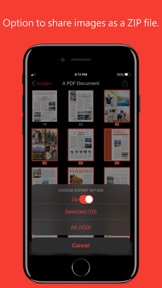


PDF to JPG is a productivity utility for iOS that converts PDF documents into image formats for professional and personal reuse.
Product velocity
Active
Daily rank 🇺🇸
—
Productivity
Sentiment
4.8
136 reviews
Nemesis

iLovePDF: PDF Editor & Scanner
The App DNA
What makes this app unique?
Users hire this app for a one-time purchase alternative to subscription-based document suites, prioritizing cost-predictability and offline security over cloud-heavy feature sets.
For iPhone and iPad users who need to convert documents into image formats for reuse or sharing.
What does it look like?
Key features
Processes multiple PDF files simultaneously using multi-core support.
Adjusts JPEG quality, resolution, and color models for specific file requirements.
Provides searchable text and zoom gestures within the app interface.
How much does it cost?
The $2.99 one-time purchase model targets users seeking to avoid recurring subscription overhead.
Velocity
Active developmentShow more...
5 versions in history. Development pace: active.
Who built it?
RootRise Technologies Pvt
13+ apps tracked · Productivity
 WPD Reader - for WordPerfect
 Winmail Reader Lite
 PDF to Text : Batch Extract Text from PDF files
 Read CHM
 PDFOptim - The PDF Compressor
 PhotoResize Pro
 WPD Converter
 PDF to JPG - A Batch Converter
 PDFGenius 4
 PhotoResize
 Winmail Reader-Lite
 XPSView
User Sentiment
What do users think recently?
The recent review mood reads excited. Users appreciate reliable pdf to image conversion provides high utility for professional document workflows.
How are ratings & reviews evolving?
What users say, by theme
- Reliable PDF to image conversion provides high utility for professional document workflows
- Occasional application crashes during file import processes disrupt the conversion workflow
17 of 17 recent reviews analyzed · moderate confidence · Excited overall
Read the full review analysisUnlock 1 user request, each backed by review evidence.
Access the full report for freeCompetition
Competitive landscape for PDF to JPG - Converter
How's the Productivity market?
The app maintains a niche presence in the Productivity category, with recent chart entries in India and consistent rankings in Taiwan. Its $2.99 price point positions it as a low-friction alternative to subscription-based document suites.
Read the market outlookThe rivals identified
By iLovePDF
This is the dominant market leader in the specific PDF-to-image and utility conversion niche with a massive, established user base.
- Offers a comprehensive suite of cloud-based PDF tools beyond simple conversion, creating a sticky ecosystem for power users.
- Provides cross-platform synchronization between mobile and web, allowing users to start conversions on one device and finish on another.
- Features a robust batch processing engine that handles multiple files simultaneously, significantly reducing time for high-volume document workflows.
 Genius Scan - PDF ScannerContender
 Adobe Scan: PDF & OCR ScannerContender
 PDF Expert: Editor & ConverterContender
Unlock the head-to-head verdict: where this rival wins, and where it loses.
Access the full report for freeThe Analyst's Read
Key takeaways for PDF to JPG - Converter
Where is it heading?
The productivity market is consolidating around feature-rich suites, leaving single-purpose converters like this app exposed to feature-parity pressure. Future growth depends on stabilizing the core import workflow to prevent churn to more robust, albeit more expensive, competitors.
- Intermittent import crashes in the latest version erode the daily active habit, which compounds the rating drag already visible on Android.
- The one-time purchase model continues to drive positive sentiment, insulating the app from the churn pressure seen in subscription-based productivity tools.
The SWOT
- One-time purchase model removes recurring cost friction
- Granular output control attracts professional users
- Standalone native processing ensures document security
- Expand B2B utility via bulk-processing enhancements
- Integrate wearable-based file triggers
- Develop advanced OCR to compete with Adobe
Next best moves
Audit import crash logs because intermittent failures are the #1 churn risk for professional users → stabilize the core conversion workflow.
+ 1 more prioritized moveThe counter-intuitive read
The app's lack of cloud-sync is a feature, not a bug…
Read the full takeFeature gaps
Advanced OCR (available in Adobe Scan but absent here) +2
Since the last report: The app expanded its feature set with batch processing and granular controls while surfacing critical import stability issues that now define its primary competitive risk.
Bottom line
The app succeeds by offering a transparent, one-time purchase model, but intermittent import instability threatens its reputation among professional users. The PM should prioritize stability over new features to defend the current market segment against subscription-based rivals.
Unlock 3 critical frictions, 3 market threats, 1 more prioritized move and the analyst’s take.
Access the full report for freeFAQ
Is PDF to JPG worth paying for if I only need it occasionally?
How does PDF to JPG compare to iLovePDF?
Is PDF to JPG safe for sensitive documents?
What is a free alternative to PDF to JPG?
Report last updated