



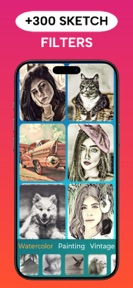



Drawify is a photo-to-sketch editor for iOS and Android that uses AI to convert personal images into artistic styles like pencil, watercolor, and oil painting.
The App DNA
What makes this app unique?
Users open Drawify to quickly generate stylized art from personal photos without needing manual drawing skills, displacing the need for complex desktop software or professional artistic training.
For Casual mobile users seeking quick, AI-assisted photo-to-art conversion tools for social media or personal creative projects.
What does it look like?
Key features
Automated conversion of user-uploaded photos into artistic sketches using an AI-based processing engine.
Tool for generating stencil-style outlines from uploaded images.
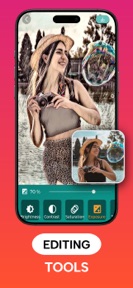
Manual adjustment tools for refining sketch outputs and applying specific artistic effects.
How much does it cost?
Drawify operates on an ad-supported freemium model, utilizing in-app purchases to monetize the user base.
Velocity
Maintenance developmentperformanceopaqueShow more...
The app is currently in a maintenance phase, with only two releases identified over the last 152 days. The latest release occurred 152 days ago, and the iOS platform has not seen an update in over 300 days. Development is limited to minor bug fixes and stability improvements, with no evidence of new features or live operations. The current release cadence is insufficient to suggest active feature development.
Who built it?

User Sentiment
What do users think recently?
Review voice lately leans mixed. Users appreciate diverse filter options and high-definition output quality provide significant creative value for photo editing enthusiasts and the core photo-to-sketch conversion process delivers impressive artistic results that users find engaging and fun, but report aggressive full-screen advertisements appearing between every few clicks disrupt the creative workflow and frustrate users.
How are ratings & reviews evolving?
Weekly average review rating
What users say, by theme
- Diverse filter options and high-definition output quality provide significant creative value for photo editing enthusiasts
- The core photo-to-sketch conversion process delivers impressive artistic results that users find engaging and fun
- Aggressive full-screen advertisements appearing between every few clicks disrupt the creative workflow and frustrate users
52 of 52 recent reviews analyzed · high confidence · Mixed overall
Read the full review analysisUnlock 2 more frustration themes and 1 user request, each backed by review evidence.
Access the full report for freeCompetition
Competitive landscape for Photo to Sketch - Drawify
How's the Photo & Video market?
Drawify maintains a presence in the Photo & Video category with a 4.46 rating on Android and 4.63 on iOS. The five-month update gap suggests a focus on maintenance rather than market share expansion, which risks ceding ground to more active competitors.
Read the market outlookThe rivals identified
Unlock the deeper market read.
Access the full report for freeThe Analyst's Read
Key takeaways for Photo to Sketch - Drawify
Where is it heading?
The market for automated art tools is consolidating around apps that balance high-quality rendering with stable, non-intrusive experiences. Drawify's current maintenance-only cadence and technical instability leave it exposed to churn, as users will likely migrate to more reliable alternatives if these stability issues persist into the next quarter.
- Technical regressions in the latest release cause crashes, which erodes the daily active habit and compounds existing rating pressure.
- The five-month gap in feature development suggests a maintenance-only posture, leaving the app vulnerable to rivals with faster live-ops cadences.
The SWOT
- AI-driven sketch engine delivers high-definition artistic results
- Manual highlight and shadow sliders would improve customization
Next best moves
Audit ad-frequency logic because frequent full-screen ads are the top user complaint → reduce churn
+ 1 more prioritized moveThe counter-intuitive read
The lack of updates is not just a resource constraint…
Read the full takeSince the last report: Drawify remains in a maintenance-only state with no new feature releases, though the analysis now provides platform-specific rating data and a more explicit assessment of churn risk.
Bottom line
Drawify's core AI rendering is effective, but the current stability regressions and ad-heavy experience are eroding user trust. Addressing these technical failures would stabilize the base, preventing the churn that currently outweighs the app's creative utility.
Unlock 2 critical frictions, 1 market threat, 1 more prioritized move and the analyst’s take.
Access the full report for freeFAQ
Is Drawify free to use?
Does Drawify work for professional photo editing?
Why does the app crash when I select a photo?
Sources
- [1] Play Store, source
Report last updated