






Photos Backup for Synology is a utility app for iOS that automates photo library synchronization to Synology NAS hardware.
The App DNA
What makes this app unique?
The app removes the manual foreground-sync requirement imposed by native Synology software, allowing users to maintain local backups without constant device interaction.
For Synology NAS owners who require reliable, automated, and organized photo backup solutions for their iPhone libraries.
What does it look like?
Key features
Maintains backup processes in the background using iOS idle-time automation, unlike the native DS file app which requires the app to remain in the foreground.
Mirrors iPhone favorites and custom albums directly into specific Synology folder structures.
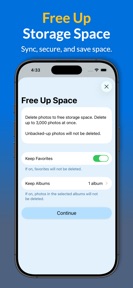
Verified tool to delete local iPhone photos after confirming they are safely stored on the Synology NAS.
How much does it cost?
Freemium model gates advanced synchronization features behind a trial, targeting NAS power users.
Velocity
Steady developmentUX improvementsperformanceShow more...
Photos Backup for Synology maintains a steady development pace, with two releases occurring over the last 33 days. The latest version continues the trend of minor technical refinements, following a pattern of stability-focused updates. Development is currently characterized by incremental improvements rather than major feature additions. The app remains stable with a consistent, predictable update frequency.
Who built it?
Sonar Workshop
3 apps tracked · Photo & Video
 Photos Backup for NAS
 Photos Backup for QNAP
User Sentiment
What do users think recently?
Fresh user feedback skews excited. Users appreciate reliable photo backup to local nas hardware provides users with a secure alternative to cloud storage and fast transfer speeds during large photo migrations allow users to move thousands of files efficiently.
How are ratings & reviews evolving?
What users say, by theme
- Reliable photo backup to local NAS hardware provides users with a secure alternative to cloud storage
- Fast transfer speeds during large photo migrations allow users to move thousands of files efficiently
- Responsive developer support helps users resolve complex connection issues during initial NAS setup and configuration
- Lack of background execution forces users to keep the app open during long backup sessions
29 of 29 recent reviews analyzed · moderate confidence · Excited overall
Read the full review analysisUnlock 2 more frustration themes and 1 user request, each backed by review evidence.
Access the full report for freeCompetition
Competitive landscape for Photos Backup for Synology
How's the Photo & Video market?
Photos Backup for Synology occupies a specialized niche in the Photo & Video category, maintaining a 4.8-star rating across 624 total ratings. The app's steady monthly update cadence signals a commitment to stability that differentiates it from abandoned utility tools in the NAS-management space.
Read the market outlookThe rivals identified
Unlock the deeper market read.
Access the full report for freeThe Analyst's Read
Key takeaways for Photos Backup for Synology
Where is it heading?
Users report: The market for NAS-based photo management is consolidating around tools that offer better reliability than official manufacturer apps. Photos Backup for Synology is well-positioned to capture this segment if it resolves the current connection stability issues, as the demand for private, cloud-free photo storage continues to grow.
- The steady monthly release cadence ensures the app remains compatible with the latest iOS versions, maintaining user trust in backup reliability.
- Frequent reports of connection timeouts during large transfers suggest the current API implementation struggles with high-volume data, risking churn among power users.
The SWOT
- iOS idle-time automation enables background sync processes that native alternatives fail to maintain
- Direct Synology API integration provides a secure, native-like authentication experience
- Implementing an automated local-file deletion wizard would directly address the top user request for storage management
Next best moves
Ship automated post-backup cleanup wizard because it is the top-requested missing feature → reduce manual storage management friction
+ 1 more prioritized moveThe counter-intuitive read
The app's reliance on iOS idle-time automation is a vulnerability…
Read the full takeSince the last report: The app's development priority has shifted from general stability to addressing specific connection timeouts during large batch transfers. This pivot reflects a more defensive posture against technical bottlenecks that threaten the app's core value proposition.
Bottom line
Photos Backup for Synology maintains a strong position by solving the background-sync limitation inherent in official manufacturer software. Prioritizing an automated storage-cleanup wizard would resolve the primary user friction point, further cementing its utility for NAS power users.
Unlock 2 critical frictions, 1 market threat, 1 more prioritized move and the analyst’s take.
Access the full report for freeFAQ
Is Photos Backup for Synology better than the official Synology Photos app?
Does Photos Backup for Synology work if I don't have a Synology NAS?
Is my data safe when using this app?
What should I do if my backup stops when I close the app?
Sources
- [1] App Store, source
Report last updated