





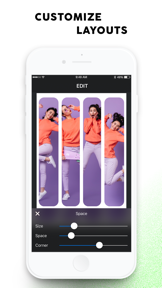

Photos Collage Maker is a photo-editing utility for creating grids and collages, targeted at social media users on Android.
The App DNA
What makes this app unique?
Users hire this app for quick, template-based visual storytelling that avoids the complexity of professional design tools, so the primary value is speed-to-output.
For Social media users and individuals creating digital memory books who require quick, template-based photo editing tools.
What does it look like?
Key features
Arrangement of up to 15 photos into customizable geometric and side-by-side frames
Image tone, lighting, bokeh, and sketch-style filters applied via single-tap interface
Overlay of decorative stickers, neon outlines, and text fonts onto photo collages
How much does it cost?
Ad-supported free model with subscription-based premium access, monetizing high-volume user base through ad-inventory.
Velocity
Dormant developmentopaqueShow more...
The development momentum is classified as zombie status due to the extreme lack of activity. The only available release data shows a single version from 2019, indicating no updates for over 78 months. There is no evidence of ongoing maintenance, feature development, or live operations. The app appears to be abandoned by its publisher.
Who built it?
Lyrebird Studio
13+ apps tracked · Photo & Video
 Toonapp: AI Photo & Video Art
 FaceLab: Face Age, Hair Filter
 Cross Stitch Pattern, Pixelart
 ArtistA: Cartoon Photo Editor
 NeonArt: Neon Background Maker
 ToonApp AI+ Viral Photo Maker
 ToonArt Photo Cartoon Yourself
 AI Aging Booth App, FaceEditor
 FaceLab AI+ Age & Hair Editor
 Background Changer of Photo
 Sticker Maker: Create Stickers
 Photo Editor Pic Collage Maker
User Sentiment
What do users think recently?
Review voice lately leans thrilled. Users appreciate intuitive interface design allows users to navigate and edit photos with minimal effort and diverse selection of creative filters and collage tools provides high value for users, but report requirement for an active internet connection limits utility during offline editing sessions.
How are ratings & reviews evolving?
What users say, by theme
- Intuitive interface design allows users to navigate and edit photos with minimal effort
- Diverse selection of creative filters and collage tools provides high value for users
- Requirement for an active internet connection limits utility during offline editing sessions
50 of 50 recent reviews analyzed · high confidence · Thrilled overall
Read the full review analysisCompetition
Competitive landscape for Photos Collage Maker
How's the Photo & Video market?
The app maintains a 4.78 rating on Android with over 1.4 million ratings, signaling strong product-market fit for casual users despite the lack of iOS traction.
Read the market outlookThe rivals identified

By Cardinal Blue
Direct thematic overlap in collage-first utility with massive scale and high-frequency release cadence.
- Offers a robust social community feed for sharing collages directly within the app ecosystem.
- Provides extensive seasonal sticker and background content libraries updated with high frequency.
- Integrates advanced cutout tools that allow users to isolate subjects from complex photo backgrounds.
 Photo Collage - CollageableContender
 Canva: AI Video & Photo EditorContender
 InstaSize: AI Photo EditorContender
Unlock the head-to-head verdict: where this rival wins, and where it loses.
Access the full report for freeThe Analyst's Read
Key takeaways for Photos Collage Maker
Where is it heading?
The casual photo-editing market is consolidating around viral, template-driven platforms, leaving static grid tools like this app exposed to churn. The team must transition to offline-first functionality to maintain relevance against high-velocity competitors.
- Internet dependency for core features limits utility, which forces users to seek offline-capable alternatives during travel or low-connectivity periods.
- High sentiment scores indicate the core grid-layout utility remains effective, providing a stable foundation for future feature expansion.
The SWOT
- Lightweight interface avoids feature bloat
- Intuitive design sustains organic install velocity
- High-frequency visual effects maximize ad-inventory
- B2B distribution via memory-book partnerships
- Integration of AI-driven background removal
Next best moves
Ship offline-first editing mode because internet dependency is the top complaint → reduce churn
+ 1 more prioritized moveThe counter-intuitive read
The app's lack of feature bloat is its primary moat…
Read the full takeFeature gaps
Social community feed (available in PicCollage) +2
Since the last report: The app shifted to a freemium monetization model and identified internet-dependency as a core user complaint.
Bottom line
The app wins on simplicity and ad-light design, but the internet-dependency friction limits its potential as a mobile-first tool, so the team must prioritize offline-first capabilities to defend against feature-rich rivals.
Unlock 3 critical frictions, 3 market threats, 1 more prioritized move and the analyst’s take.
Access the full report for freeFAQ
Does this app work without an internet connection?
Is this app better than PicCollage?
Is this app suitable for casual photo editing?
What is a free alternative to this app?
Report last updated