



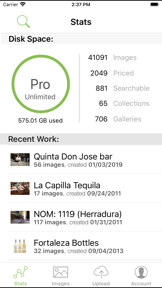

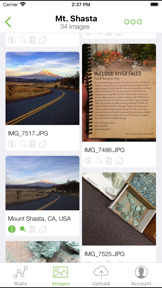
PhotoShelter is a digital asset management companion app for professional photographers to search, price, and upload images on iOS.
The App DNA
What makes this app unique?
Users hire the app to manage large-scale archives and fulfill client requests while traveling, replacing the need for a laptop in the field.
For Professional photographers, creative teams, and enterprise brands requiring secure digital asset management and real-time distribution.
What does it look like?
Key features
Automated image tagging, similarity search, and AI-generated alt text for library management
Automated workflows to push assets to social media and stakeholders in seconds
Custom access controls for public, invited-only, and view/download restrictions
How much does it cost?
Subscription-only model targeting professional and enterprise users, with no free tier for the core business platform.
Velocity
Dormant developmentopaqueShow more...
The app has not received a public update in over three years, indicating a complete cessation of development activity. There is no evidence of feature updates, bug fixes, or live operations. The project is effectively in a zombie state with no recent development momentum.
Who built it?

User Sentiment
What do users think recently?
Fresh user feedback skews frustrated. Users appreciate mobile access to large image archives provides essential utility for professional photographers on the move, but report ui regressions and layout failures prevent access to critical gallery permission settings on modern devices.
How are ratings & reviews evolving?
What users say, by theme
- Mobile access to large image archives provides essential utility for professional photographers on the move
- UI regressions and layout failures prevent access to critical gallery permission settings on modern devices
58 of 58 recent reviews analyzed · high confidence · Frustrated overall
Read the full review analysisUnlock 1 user request, each backed by review evidence.
Access the full report for freeCompetition
Competitive landscape for PhotoShelter
How's the Photo & Video market?
The app maintains a 2.3-star rating across 58 reviews, signaling that its utility for professional archive management is currently overshadowed by persistent UI regressions. The lack of updates since 2022 prevents it from competing with modern, hardware-integrated photography tools.
Read the market outlookThe rivals identified

By Blackmagic Design Inc
This app competes by dominating the professional mobile capture workflow, directly challenging PhotoShelter's role as the primary hub for high-end photography business management.
- Deep integration with Blackmagic Cloud allows real-time collaborative workflows that PhotoShelter currently lacks for video.
- Professional-grade Bluetooth camera control provides granular hardware adjustments far beyond PhotoShelter's basic file management capabilities.
- Massive user base and high-frequency updates create a strong ecosystem lock-in for professional videographers.



Unlock the head-to-head verdict: where this rival wins, and where it loses.
Access the full report for freeThe Analyst's Read
Key takeaways for PhotoShelter
Where is it heading?
The professional photography market is shifting toward end-to-end, hardware-integrated workflows that prioritize speed and collaboration. PhotoShelter's current posture is exposed: without a significant mobile refresh, it will continue to lose professional users to rivals that offer seamless capture-to-delivery.
- Persistent UI regressions and file compression issues drive negative sentiment, which compounds the churn risk among professional users.
- The lack of multi-user support prevents the app from scaling into team-based workflows, limiting its relevance for enterprise clients.
The SWOT
- Enterprise-grade permission controls function as a B2B distribution barrier
- Adobe Creative Cloud integration increases switching costs for professional creative teams
- Education partnerships untapped as B2B distribution channel
- Integration of capture-to-delivery automation to counter hardware-integrated rivals
Next best moves
Rebuild gallery permission menus because they are unreachable on modern devices → restore basic app utility
+ 1 more prioritized moveThe counter-intuitive read
The app's biggest risk is not a lack of features…
Read the full takeFeature gaps
Real-time collaborative infrastructure (available in Blackmagic Camera Control but absent here) +1
Since the last report: The app's competitive position has declined due to unresolved UI regressions and newly identified file quality degradation, prompting a shift toward urgent technical remediation.
Bottom line
PhotoShelter provides essential archive access for professionals, but the mobile app is currently failing due to broken UI and file degradation, so the PM must prioritize core usability fixes to prevent further churn to hardware-integrated competitors.
Unlock 3 critical frictions, 2 market threats, 1 more prioritized move and the analyst’s take.
Access the full report for freeReport last updated