
Report updated May 23, 2026

PingPlotter is an established utilities app that is free with in-app purchases. With a 3.4/5 rating from 36 reviews, it shows polarized user reception. Users particularly appreciate diagnostic utility provides clear visibility into network packet loss and path latency issues, though frequent application crashes during launch or export processes hinder basic diagnostic workflows remains a common concern.

What is PingPlotter?

PingPlotter is a network diagnostic utility providing graphical traceroute and ping analysis for engineers and gamers on iOS.

Users hire PingPlotter to generate objective, visual evidence of network performance issues, enabling them to isolate faults between local hardware and remote services.

Current Momentum

v1.4 · 58mo ago

Zombie
  • No major feature releases since 2021.

Active Nemesis

Fragmented niche

No dominant direct rival identified yet — see Other Rivals below.

Other Rivals

Ultimaker
SafeZone
Banyan Security
Allegion ENGAGE
NetForge: Engineer's Toolkit

7-Day Rank Pulse 🇺🇸

Utilities

No ranking data

Rating Pulse 🇺🇸

Recent User Mood

What makes this app unique?

What Does It Look Like?

Loading...

What Are The Key Features?

Graphical Traceroute and PingStandard

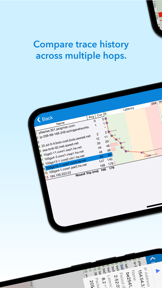
Visualizes latency and packet loss across multiple network hops using a dual-graph interface

Audio-based MonitoringDifferentiator

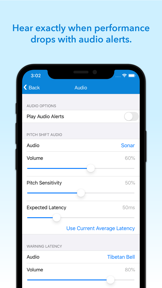
Streams background audio alerts to notify users of network performance drops during gaming or other activities

Unlimited Timeline HistoryStandard

Extends the duration of performance data storage beyond the free-tier limits

Cross-Platform Data LoadingDifferentiator

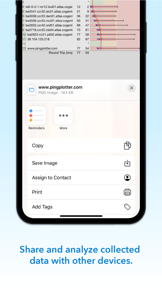
Imports and loads network data files collected by desktop versions of the software

How much does it cost?

Freemium
  • Free tier with basic graphing and tracing
  • Premium upgrade at $8.99 for advanced features

Freemium model anchored at a one-time $8.99 upgrade, gating advanced monitoring and data persistence features.

Who Built It?

Utilities

Enrichment in progress

Publisher profile available very soon

What other apps does Pingman Tools make?

What do users think recently?

Low confidence · 37 reviews analyzed

How did the latest release land?

Overall
3.4/ 5
(36)
Current version
3.4/ 5
0.0 vs overall
(36)
Main signal post-update: diagnostic utility provides clear visibility into network packet loss and path latency issues.

What is the recent mood?

Mixed

Recent user voice shows a mixed sentiment. Users appreciate diagnostic utility provides clear visibility into network packet loss and path latency issues and desktop-grade network analysis features now available on mobile devices for field troubleshooting, but report frequent application crashes during launch or export processes hinder basic diagnostic workflows and inconsistent ui scaling and layout issues on modern mobile screen resolutions.

Limited review volume (37 reviews). Sentiment analysis will deepen as more data lands.

View the full user-sentiment analysis

Mood gauge, ratings & review-volume history, every praise / complaint / request, and sentiment over time.

Go deeper

What is the competitive landscape for PingPlotter?

Where is it available?

Localized markets (1)

United States

How's The Utilities Market?

Market outlook for this category

Available very soon

The rivals identified

Same space(4)

Allegion ENGAGE icon

Schlage Lock Company

2.2(55)

Both apps serve as specialized utility tools for managing infrastructure, though they focus on different physical and digital security domains.

Differentiators

  • Focuses on physical lock configuration and credential management rather than network packet path analysis.
  • Integrates directly with enterprise-grade physical access hardware, creating a distinct hardware-software ecosystem lock-in.

These apps overlap in the enterprise network space, specifically regarding the visibility and security of network access points.

Differentiators

  • Prioritizes Zero Trust Network Access and device posture scoring over PingPlotter’s raw network diagnostic graphing.
  • Targets enterprise security compliance workflows whereas PingPlotter focuses on individual network troubleshooting and latency monitoring.
SafeZone icon

CriticalArc Pty Ltd

3.8(364)

Both apps function as critical utility tools for monitoring and responding to environmental or network-based status changes.

Differentiators

  • Provides emergency alerting and wellbeing check-ins, shifting the utility focus from network health to personal safety.
  • Maintains a significantly larger user base and higher review volume, indicating stronger institutional adoption and trust.

These apps share a common utility framework centered on remote monitoring and network-based discovery of connected hardware.

Differentiators

  • Specializes in remote 3D printer monitoring rather than the general-purpose network traceroute tools PingPlotter provides.
  • Offers live notifications triggered by hardware status changes, a feature PingPlotter lacks for non-network devices.

New entrants(1)

This app is a direct functional competitor that targets the same network engineering audience with a modern, recipe-based diagnostic approach.

Differentiators

  • Features curated diagnostic recipes and vendor command references, lowering the barrier to entry for junior engineers.

Compare PingPlotter against every rival

All rivals in one side-by-side table — identity, store metrics, ratings & sentiment, and strategic intel — plus a head-to-head page for each.

Go deeper

The outtake for PingPlotter

Strengths to defend, gaps to attack

Core Strengths

  • Cross-platform data loading creates a high switching cost for existing desktop users
  • Dual-graph traceroute mechanism provides objective evidence for ISP troubleshooting

Critical Frictions

  • Frequent launch crashes on current hardware
  • Inconsistent UI scaling on modern screen resolutions
  • Lack of background execution support

Growth Levers

  • Integration with cloud-based monitoring services to align with desktop capabilities
  • Granular ping interval controls for Wi-Fi testing

Market Threats

  • Modern, recipe-based diagnostic tools like NetForge lowering the barrier to entry
  • Persistent technical regressions eroding professional trust

What are the next best moves?

highPivot

Rebuild launch sequence because launch crashes are the #1 complaint theme → restore basic utility

Launch crashes prevent any diagnostic use, directly causing 1-star reviews.

Trade-off: Pause the cloud-sync integration sprint — stability is the prerequisite for retention.

mediumMaintain

Audit UI layout constraints because scaling issues render buttons unusable → improve professional perception

UI scaling regressions on modern screens are the second most cited frustration.

Trade-off: Deprioritize the granular ping interval feature — UI usability is a higher-frequency blocker.

A counter-intuitive read

The app's reliance on a desktop-linked workflow is its primary moat, yet this same dependency makes it vulnerable to modern, mobile-native diagnostic tools that do not require legacy data imports.

Feature Gaps vs Competitors

  • Recipe-based diagnostic workflows (available in NetForge but missing here)
  • Live hardware-status notifications (available in Ultimaker but missing here)

Key Takeaways

PingPlotter holds a unique position through its desktop-to-mobile data continuity, but persistent launch crashes and UI regressions actively alienate its professional user base, so the team must prioritize stability over new features to prevent further churn.

Where Is It Heading?

Declining

The network diagnostic market is consolidating around modern, mobile-native tools that prioritize stability and ease of use. PingPlotter's current maintenance-mode posture leaves it exposed to faster-moving entrants, so the PM must shift focus from feature parity to technical hygiene to retain the professional segment.

Persistent launch crashes and UI scaling regressions in the latest release erode professional trust, which directly correlates with the declining sentiment trend.

Recent updates focused on audio alert and purchase restoration bugs, but failed to address the core stability issues blocking daily diagnostic workflows.

Disclosure: Independent intel to help mobile builders succeed.

AI-powered analysis with editorial review, built from publicly available sources. Marlvel.ai is not affiliated with, endorsed by, or sponsored by PingPlotter, its developer, the app publisher, Apple, or Google Play. All trademarks, logos, and screenshots referenced remain the property of their respective owners.

What's new

The app's competitive position has declined due to critical technical regressions, forcing a pivot from feature expansion to stability-focused maintenance.

declined

Emergence of critical stability complaints

shifted

Pivot to stability-first development

added

Technical regressions as a primary threat

added

Unlimited Timeline History

Cite this report

Marlvel.ai. “PingPlotter Intelligence Report.” Updated May 23, 2026. https://marlvel.ai/apps/pingplotter

Agent Markdown (.md)See methodologyContact support

Data licensed under CC-BY-NC 4.0