


PIXEL86: Retro Media Editor
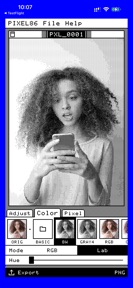
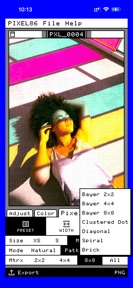
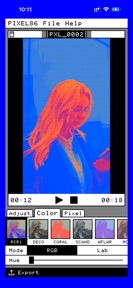
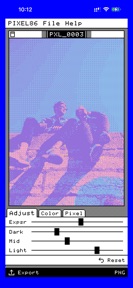
PIXEL86 is a retro media editor for iOS that applies dithering and vintage palettes to photos and videos.
The App DNA
What makes this app unique?
The app removes the technical friction of manually simulating early computer graphics, allowing creators to achieve a specific glitchy aesthetic without complex desktop software.
For Digital artists and social media creators interested in retro, glitch, and early computer graphics aesthetics.
What does it look like?
Key features
Converts images to pure black and white pixels using error diffusion to simulate depth without grayscale.
Applies retro dithering styles to video clips on a frame-by-frame basis.
Allows users to select curated vintage palettes or build custom color sets for media output.
How much does it cost?
PIXEL86 is currently distributed as a free tool without explicit in-app purchase or subscription gates.
Velocity
Maintenance developmentperformanceopaqueShow more...
PIXEL86: Retro Media Editor is currently in a maintenance cycle, with the latest release occurring 49 days ago. The development history shows a single update in the observed window, which focused exclusively on generic performance and stability improvements. There is no evidence of new feature development or live operations, indicating a stable but inactive product state. The publisher relies on opaque release notes, providing no insight into specific technical changes or roadmap progress.
Who built it?
User Sentiment
What do users think recently?
How are ratings & reviews evolving?
Not enough recent reviews to extract reliable themes yet.
Read the full review analysisCompetition
Competitive landscape for PIXEL86: Retro Media Editor
How's the Photo & Video market?
PIXEL86 occupies a specialized niche in the Photo & Video category with a 4.6-star rating across 42 reviews. The absence of monetization gates suggests a focus on user acquisition over immediate revenue, contrasting with the subscription-heavy models of broader editing suites.
Read the market outlookThe rivals identified
Unlock the deeper market read.
Access the full report for freeThe Analyst's Read
Key takeaways for PIXEL86: Retro Media Editor
Where is it heading?
The retro-editing market is consolidating around tools that offer both aesthetic filters and social sharing. PIXEL86 remains advantaged by its specialized engine but exposed by its lack of community features, which will likely lead to churn if competitors integrate similar dithering effects into their social-first workflows.
- The 49-day maintenance cadence suggests the developer is prioritizing stability over expansion, which limits the app's ability to scale against active rivals.
- The 4.6-star rating indicates the core dithering engine satisfies the target audience, providing a stable base for future community-focused features.
The SWOT
- True B/W dithering engine simulates depth without grayscale
- Frame-by-frame video dithering provides unique motion-art capabilities
- Community-driven palette sharing would increase user engagement
- In-app export to social platforms would improve discoverability
Next best moves
Ship community palette-sharing feature because current palettes are static → increase user-generated content loops
+ 1 more prioritized moveThe counter-intuitive read
The maintenance-mode status is a feature, not a bug…
Read the full takeSince the last report: The product strategy shifted from a focus on monetization to community-driven retention, while the competitive outlook transitioned from 'mixed' to 'stable' as the developer embraced the app's static, maintenance-mode status.
Bottom line
PIXEL86 maintains a strong niche position through its specialized dithering engine, but the lack of feature updates risks stagnation. Prioritizing a community-driven palette-sharing feature would unlock user-generated content loops that currently remain untapped.
Unlock 2 critical frictions, 2 market threats, 1 more prioritized move and the analyst’s take.
Access the full report for freeFAQ
Is PIXEL86 free to use?
Does PIXEL86 work for video editing?
Can I create custom color palettes?
Sources
- [1] App Store
Report last updated