


Planningify : Work timesheet


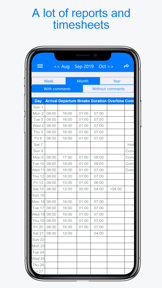


Planningify is a time-tracking and timesheet management tool for shift workers and freelancers, structured around a calendar-based interface on iOS and Android.
The App DNA
What makes this app unique?
It removes the manual effort of calculating extra hours and overtime, replacing spreadsheet-based tracking with automated, printable reports.
For Shift workers, freelancers, and project managers who need to track hours, calculate overtime, and generate professional reports for clients or employers.
What does it look like?
Key features
Automated calculation of extra and overtime hours based on expected versus worked hours in one click.
Generates printable reports and exports to spreadsheet formats like Excel, Numbers, and Google Sheets.
Supports tracking multiple agendas, clients, or projects within a single interface.
How much does it cost?
The freemium model gates advanced productivity features behind a subscription, while keeping core time-tracking free to maximize user acquisition.
Velocity
Maintenance developmentperformanceplatform expansionShow more...
The app currently operates at a maintenance cadence, with only two releases identified in the analyzed window. The latest version, released 33 days ago, was limited to an update for Android 15, while the iOS platform has not seen an update in 828 days. Development appears focused exclusively on technical stability and platform support rather than new features or content. The overall trend is one of minimal activity, with significant disparity between platform update schedules.
Who built it?
Alexandre Thil
3 apps tracked · Utilities
 Fast Typing Game : Type speed
 Quangame : Vietnamese game
User Sentiment
What do users think recently?
Recent user voice shows a mixed sentiment. Users appreciate core utility of the time-tracking tool makes daily work routines significantly more manageable for users and responsive customer service interactions build trust and satisfaction for long-term users of the application.
How are ratings & reviews evolving?
What users say, by theme
- Core utility of the time-tracking tool makes daily work routines significantly more manageable for users
- Responsive customer service interactions build trust and satisfaction for long-term users of the application
- Aggressive advertising frequency interrupts the user workflow and makes navigation difficult during shift entry
47 of 47 recent reviews analyzed · high confidence · Mixed overall
Read the full review analysisUnlock 2 more frustration themes and 2 user requests, each backed by review evidence.
Access the full report for freeCompetition
Competitive landscape for Planningify : Work timesheet
How's the Utilities market?
Planningify maintains a 4.5-star rating on iOS across 20 reviews and a 4.1-star rating on Android across 1,792 reviews. The disparity in review volume suggests a significantly larger Android user base, making the reported technical instability on that platform a critical retention risk.
Read the market outlookThe rivals identified
Unlock the deeper market read.
Access the full report for freeThe Analyst's Read
Key takeaways for Planningify : Work timesheet
Where is it heading?
The market for time-tracking utilities is shifting toward reliable, low-friction experiences that integrate with professional workflows. Planningify remains exposed due to its maintenance-mode cadence and reliance on intrusive ads, which will likely accelerate churn as users seek more stable, ad-free alternatives.
- Technical instability and sync failures prevent reliable data entry, which erodes trust among premium subscribers.
- Aggressive ad frequency interrupts the user workflow, leading to high uninstall rates among the free-tier user base.
The SWOT
- Calendar-based interface reduces cognitive load for daily clock-in/out
- Automated overtime wizard provides immediate value for shift workers
- Spreadsheet-friendly export formats create professional-grade utility
- Implement a one-time purchase lifetime license to capture users resistant to recurring subscriptions
- Introduce offline-first sync architecture to resolve reported data-entry failures
Next best moves
Audit ad frequency during shift entry because it is the top-cited reason for uninstalls → reduce churn
+ 1 more prioritized moveThe counter-intuitive read
The high ad density is not just a…
Read the full takeBottom line
Addressing the technical instability and ad-density friction would stabilize the core user base, which currently struggles with basic data reliability. Prioritizing these fixes over new feature development will protect the existing subscription funnel from further erosion.
Unlock 3 critical frictions, 2 market threats, 1 more prioritized move and the analyst’s take.
Access the full report for freeFAQ
Is Planningify suitable for freelancers?
Does Planningify offer a one-time purchase option?
Can I use Planningify offline?
Sources
- [1] Play Store listing
- [2] App Store reviews
Report last updated