


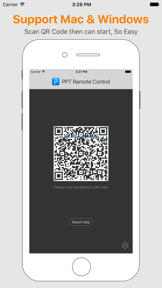
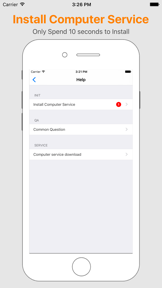

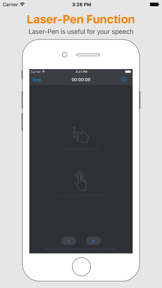
PPT Remote Control is a mobile-based utility for slide navigation and laser pointer simulation on Windows and Mac computers.
The App DNA
What makes this app unique?
Presenters use the tool to replace traditional hardware remotes with a mobile device, removing the need for additional physical equipment during speeches.
For Presenters and speakers using Windows or Mac computers who require a mobile-based remote control for slide decks.
What does it look like?
Key features
Remote control functionality to flip presentation slides via mobile device.
On-screen laser light effect with adjustable color and size settings.
Desktop companion service required for Windows and Mac connectivity.
How much does it cost?
The app is distributed as a free utility without visible in-app purchase gates or subscription tiers.
Velocity
Dormant developmentopaqueShow more...
The app has reached a zombie state, with no updates or feature development recorded in over 3,300 days. The last release was a minor technical update to ensure compatibility with legacy watchOS versions. There is no evidence of ongoing maintenance or operational activity.
Who built it?
User Sentiment
What do users think recently?
Fresh user feedback skews thrilled. Users appreciate simple qr code scanning setup allows users to begin using the app immediately without friction and smooth performance during operation provides a reliable experience for users during their daily tasks.
How are ratings & reviews evolving?
What users say, by theme
- Simple QR code scanning setup allows users to begin using the app immediately without friction
- Smooth performance during operation provides a reliable experience for users during their daily tasks
1 of 1 recent reviews analyzed · limited sample
Read the full review analysisCompetition
Competitive landscape for PPT Remote Control - With laser pointer function
How's the Utilities market?
PPT Remote Control serves a niche utility segment with no active development for over nine years. The total rating count of three across all platforms indicates minimal market presence and low user engagement.
Read the market outlookThe rivals identified
Unlock the deeper market read.
Access the full report for freeThe Analyst's Read
Key takeaways for PPT Remote Control - With laser pointer function
Where is it heading?
The presentation utility market has shifted toward cloud-integrated, cross-platform solutions that offer native support for modern hardware. PPT Remote Control remains stagnant, and the lack of development investment ensures it will continue to lose relevance as OS updates render its desktop companion service obsolete.
- The nine-year update gap leaves the tool incompatible with modern OS security standards, which will eventually break core connectivity features.
- Minimal user engagement (three total ratings) suggests the tool is no longer a primary choice for presenters in the current market.
The SWOT
- Simple QR-based setup allows immediate configuration
- Modernizing the interface could attract lightweight-utility users
Next best moves
Sunset the product because the nine-year update gap creates unmanageable compatibility risks → reduce brand liability
The counter-intuitive read
The lack of updates is the product's primary feature: it remains a static…
Read the full takeSince the last report: The product strategy shifted from a maintenance-mode outlook to a formal sunset recommendation, driven by the persistent nine-year development gap and lack of market traction.
Bottom line
The nine-year development gap renders PPT Remote Control a high-risk utility that cannot guarantee compatibility with current operating systems. Sunset the product to avoid brand liability, as the maintenance-mode status prevents it from competing with modern, supported alternatives.
Unlock 2 critical frictions, 1 market threat and the analyst’s take.
Access the full report for freeFAQ
Is PPT Remote Control safe to use on modern Windows or Mac systems?
Does PPT Remote Control require an internet connection?
What is a modern alternative to PPT Remote Control?
Sources
- [1] App Store, source
Report last updated