Report updated May 25, 2026

Prezi Viewer is a challenged productivity app that is free with in-app purchases. With a 4.3/5 rating from 56.5K reviews, it faces significant user friction. Users particularly appreciate the presentation tool provides a unique visual impact that increases audience engagement levels significantly, though aggressive subscription billing practices and lack of responsive customer support frustrate users seeking refunds remains a common concern.

What is Prezi Viewer?

Prezi Viewer is a mobile presentation app for viewing and presenting non-linear slide decks on iOS and Android.

Users hire the app to deliver high-impact visual pitches in offline or remote environments where standard slide software lacks the necessary visual flexibility.

Current Momentum

v4.32 · 5mo ago

Steady
  • Ships stability improvements across mobile platforms.
  • Engine upgrades improve presentation rendering performance.

Active Nemesis

Microsoft PowerPoint

Microsoft PowerPoint

By Microsoft

Other Rivals

Google Slides
Keynote: Design Presentations
Zoho Show: Presentation Maker
Polaris Office: Edit&View, PDF
Notability: AI Notes & PDF app

7-Day Rank Pulse 🇺🇸

Productivity

No ranking data

ProductivityGrossing

Rating Pulse 🇺🇸

Recent User Mood

What makes this app unique?

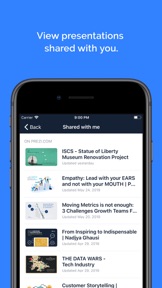
What Does It Look Like?

What Are The Key Features?

Offline Presentation ModeDifferentiator

Allows users to save and present content without an active internet connection

Apple TV Airplay IntegrationDifferentiator

Streams presentations from mobile devices to large screens via Airplay

How much does it cost?

Freemium
  • Free viewer and presenter app
  • Paid subscription tiers for creation and advanced features via Prezi website

The mobile app functions as a free utility to drive usage of the broader Prezi subscription-based presentation platform.

Who Built It?

Prezi Inc. app icon

Prezi

(29)

Enabling mobile productivity by allowing users to view and present complex visual slide decks on the go. Bridging the gap between desktop creation and mobile delivery.

Portfolio

2

Apps

Free 1
Photo & Video100%

Explore the full Prezi report

Portfolio breakdown, audience, momentum, and every app published by Prezi.

Go deeper

What do users think recently?

Low confidence · 49 reviews analyzed

How did the latest release land?

Overall
4.3/ 5
(56.5K)
Current version
4.5/ 5
+0.2 vs overall
(7.7K)
Main signal post-update: the presentation tool provides a unique visual impact that increases audience engagement levels significantly.

What is the recent mood?

Frustrated

Recent user voice shows a frustrated sentiment. Users appreciate the presentation tool provides a unique visual impact that increases audience engagement levels significantly, but report aggressive subscription billing practices and lack of responsive customer support frustrate users seeking refunds.

Limited review volume (49 reviews). Sentiment analysis will deepen as more data lands.

View the full user-sentiment analysis

Mood gauge, ratings & review-volume history, every praise / complaint / request, and sentiment over time.

Go deeper

What is the competitive landscape for Prezi Viewer?

How's The Productivity Market?

How does it evolve in the Productivity market?

Prezi Viewer holds the #163 Free position in the US Productivity chart, while the grossing rank lags significantly behind discovery, signaling friction in the subscription conversion funnel.

Rank progression

6 active rankings tracked — 30-day window

Which niche is Prezi Viewer in?

Presentations Players

to present and practice visual presentations remotely

PlayerPresentationsProfessionalsFreemium IapEstablished

Explore the full Presentations Players niche

Every app in this space — 1 tracked, the niche's live rankings, and Marlvel's editorial take on the job-to-be-done.

Go deeper

The rivals identified

Nemeses(1)

Microsoft PowerPoint icon

Microsoft Corporation

4.8(4M)

Dominates the presentation market with massive enterprise adoption and deep integration into the Office 365 ecosystem.

Differentiators

  • Deep integration with OneDrive and SharePoint enables seamless enterprise-grade collaboration and file management workflows.
  • Advanced animation and transition engine supports complex, professional-grade slide decks beyond basic presentation needs.
  • Cross-platform parity ensures consistent editing and viewing experiences across mobile, tablet, and desktop environments.

Head to head

The target app must double down on its unique non-linear visual identity to avoid being commoditized by PowerPoint's superior ecosystem and feature breadth.

Contenders(2)

Keynote: Design Presentations icon

Apple

4.4(76.5K)

The default high-fidelity presentation tool for the Apple ecosystem, offering superior design aesthetics.

Differentiators

  • Optimized for Apple hardware, providing superior performance and battery efficiency during long presentation sessions.
  • High-end typography and motion graphics tools allow for more polished visual output than standard slide templates.
Google Slides icon
Google Slidesmoat: medium

Google

4.2(667K)

A primary competitor for cloud-native, collaborative presentation workflows with high accessibility.

Differentiators

  • Real-time multi-user collaboration allows teams to edit slides simultaneously without version control conflicts.
  • Browser-first architecture eliminates the need for dedicated viewer apps, lowering the barrier to entry for casual users.

Same space(2)

Polaris Office: Edit&View, PDF icon

Polaris Office Corp.

3.6(621.6K)

An all-in-one office suite that includes presentation viewing as part of a broader document management strategy.

Differentiators

  • Consolidates document, spreadsheet, and presentation viewing into a single app, reducing the need for multiple installations.
  • Supports a wide range of legacy file formats, catering to users who require compatibility with older office software.

A direct niche competitor focusing on presentation creation and viewing within the Zoho business suite.

Differentiators

  • Offers specialized presentation features for business contexts, such as integrated analytics and remote presentation controls.
  • Provides a more focused, business-centric feature set compared to the general-purpose tools of larger competitors.

New entrants(1)

Rapidly evolving with AI-driven features, representing a shift toward integrated note-taking and presentation workflows.

Differentiators

  • Aggressive integration of AI for summarizing and organizing content, which could disrupt traditional static presentation viewing.
  • High release velocity with 27 updates in six months indicates a focus on rapid feature iteration and user feedback.

Compare Prezi Viewer against every rival

All rivals in one side-by-side table — identity, store metrics, ratings & sentiment, and strategic intel — plus a head-to-head page for each.

Go deeper

The outtake for Prezi Viewer

Strengths to defend, gaps to attack

Core Strengths

  • Non-linear visual engine provides unique storytelling impact
  • Offline mode ensures pitch reliability for field sales teams

Critical Frictions

  • Tablet version lacks editing parity with desktop
  • High-frequency billing complaints suggest opaque cancellation flows

Growth Levers

  • Expand B2B partnerships via education-sector distribution
  • Integrate wearable controls for remote presentation management

Market Threats

  • Microsoft's 21-update cadence in six months accelerates feature parity
  • AI-driven note-taking apps disrupt static presentation workflows

What are the next best moves?

highPivot

Audit cancellation flows because billing complaints are the top sentiment driver → reduce refund surge

Sentiment analysis identifies aggressive billing and lack of support as the primary user frustration.

Trade-off: Pause the tablet-editing feature sprint — billing stability has a higher impact on immediate churn.

mediumInvest

Ship tablet editing parity because it is the top-requested feature → increase professional utility

User requests consistently highlight the lack of tablet editing as a barrier to professional use.

Trade-off: Deprioritize the wearable-remote project — tablet editing has a larger addressable user base.

A counter-intuitive read

The mobile app's lack of editing is not a technical limitation but a strategic choice to protect the desktop-subscription moat, yet this choice is now actively driving churn as competitors offer full cross-platform parity.

Feature Gaps vs Competitors

  • Full cross-platform editing parity (available in Microsoft PowerPoint but absent here)
  • Real-time multi-user collaboration (available in Google Slides but absent here)

Key Takeaways

Prezi Viewer holds its category lead through unique visual mechanics but bleeds professional users due to limited tablet functionality and billing friction, so revenue growth hinges on fixing the cancellation experience and enabling mobile-first creation.

Where Is It Heading?

Declining

The presentation market is consolidating around tools that offer full cross-platform parity, leaving Prezi's viewer-only mobile strategy exposed. Unless the team bridges the gap between mobile viewing and desktop creation, the app will continue to lose ground to competitors that treat mobile devices as full-featured workstations.

Persistent billing and support complaints in the latest release indicate that internal friction remains unaddressed, which compounds the long-term churn risk.

The lack of tablet editing parity forces power users to desktop environments, which reduces the mobile app's utility and limits its role to a passive viewer.

FAQ

Can I edit my presentations on my tablet?
Currently, the tablet version is restricted to viewing and presenting. Users cannot edit presentations on mobile devices, which is a frequent request in user reviews.
Does Prezi Viewer work without an internet connection?
Yes, the app supports offline presentation mode, allowing users to save and present content without an active internet connection.
How does Prezi compare to PowerPoint?
Prezi focuses on a unique non-linear visual storytelling format, whereas PowerPoint offers a traditional slide-based approach with deep enterprise integration and full cross-platform editing.
What is a good alternative for mobile presentation editing?
Microsoft PowerPoint and Google Slides are common alternatives that provide full editing capabilities across mobile, tablet, and desktop environments.

Disclosure: Independent intel to help mobile builders succeed.

AI-powered analysis with editorial review, built from publicly available sources. Marlvel.ai is not affiliated with, endorsed by, or sponsored by Prezi Viewer, its developer, the app publisher, Apple, or Google Play. All trademarks, logos, and screenshots referenced remain the property of their respective owners.

What's new

The app's competitive position has declined due to emerging billing friction and a lack of tablet editing parity, despite maintaining its core visual storytelling differentiator.

declined

Negative Sentiment Emergence

shifted

Architecture Friction

improved

Feature Repositioning

added

New SWOT Threats and Weaknesses

Cite this report

Marlvel.ai. “Prezi Viewer Intelligence Report.” Updated May 25, 2026. https://marlvel.ai/apps/prezi-viewer

Agent Markdown (.md)See methodologyContact support

Data licensed under CC-BY-NC 4.0