


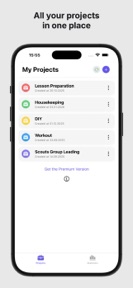



Project Time Tracker: Hours is a privacy-focused, offline-first time tracking tool for freelancers and contractors on iOS and iPadOS.
The App DNA
What makes this app unique?
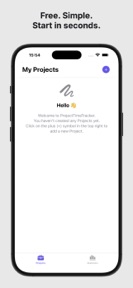
It removes the friction of account registration and team-software complexity, allowing users to track hours immediately without internet dependency.
For Freelancers, contractors, and independent professionals who require simple, privacy-focused time tracking without account registration.
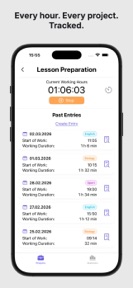
What does it look like?
Key features
Displays active project timer on the lock screen and Dynamic Island for status monitoring without opening the app
Sets daily working time limits with progress rings and reminders to prevent overwork
Generates PDF timesheets and exports data to Excel, CSV, or calendar formats
How much does it cost?
Freemium model uses a volume-based gate (250 entries per year) to capture casual users while forcing conversion for high-frequency professional use.
Velocity
Steady developmentUX improvementsinternationalizationShow more...
The app currently ships at a steady cadence, averaging approximately 0.5 releases per week over the observed window. Development is focused on functional utility, specifically enhancing billing workflows and data management capabilities. The latest release also addressed localization issues, indicating a focus on refining the existing user experience. The current trajectory is stable, with consistent updates addressing both feature requests and technical maintenance.
Who built it?
User Sentiment
What do users think recently?
How are ratings & reviews evolving?
Not enough recent reviews to extract reliable themes yet.
Read the full review analysisCompetition
Competitive landscape for Project Time Tracker: Hours
How's the Productivity market?
Project Time Tracker: Hours occupies a niche in the productivity category by emphasizing offline-first privacy over cloud-sync features. The app maintains a steady release cadence with two updates in the last month, supporting its position as a tool for independent workers.
Read the market outlookThe rivals identified
Unlock the deeper market read.
Access the full report for freeThe Analyst's Read
Key takeaways for Project Time Tracker: Hours
Where is it heading?
Market demand for privacy-focused, local-first productivity tools remains stable, but the category is increasingly crowded by feature-rich, cloud-synced alternatives. Project Time Tracker: Hours must balance its offline-first identity with the professional-grade export needs of its growing freelancer base to prevent churn to more integrated platforms.
- The latest release added billing status tracking, signaling active feature investment rather than maintenance-mode stagnation.
- The 250-entry annual limit serves as a clear conversion funnel, though it risks alienating power users who require higher volume for professional billing.
The SWOT
- Offline-first architecture removes sign-up friction for privacy-conscious users
- Time Guard feature differentiates the brand from billable-hour-focused competitors
- Localized pricing in high-ARPU markets could capture freelancers who find current subscription tiers above their local median
Next best moves
Pivot the free-tier gate from entry count to advanced export features because the 250-entry limit creates a hard churn point for active freelancers → increase long-term retention
+ 1 more prioritized moveThe counter-intuitive read
The offline-first design is a retention lever in…
Read the full takeBottom line
Project Time Tracker: Hours defends its niche by prioritizing user well-being over billing volume, but the volume-based entry gate creates a hard ceiling for professional growth. Shifting the conversion trigger from entry count to professional export features would better align the free tier with casual usage.
Unlock 1 critical friction, 1 market threat, 1 more prioritized move and the analyst’s take.
Access the full report for freeFAQ
Is Project Time Tracker: Hours suitable for professional billing?
How does this app compare to Toggl or Harvest?
Does the app require an internet connection to track time?
What are the limitations of the free version?
Sources
Report last updated