


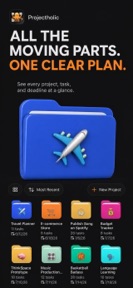




Projectholic is a project management and focus-tracking app for solopreneurs and creators on iOS and Mac.
The App DNA
What makes this app unique?
It removes the friction of juggling separate tools for task management, time tracking, and project planning by unifying them into one visual workflow.
For Solopreneurs, indie hackers, and creative professionals who need flexible project management and time-tracking tools.
What does it look like?
Key features
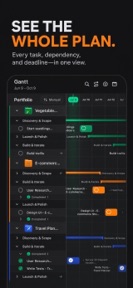
Visual project timeline with drag-and-resize phase management and subtask editing on iPad and Mac.
One-tap focus session tracking that links time spent to specific tasks or projects.
Calculates project profitability by comparing planned hours against actual focus time.
How much does it cost?
Freemium model gates multi-project management and cross-device sync behind a Pro tier to capture value from professional users.
Velocity
Maintenance developmentnew contentUX improvementsShow more...
Projectholic: Project Planner currently operates at a maintenance cadence, with only one release identified in the recent window. The latest version represents a significant feature expansion, focusing on productivity tools like session linking and Screen Time integration. Development appears stable but infrequent, with no evidence of a high-velocity release cycle. Future updates are expected to follow this sporadic pattern rather than a frequent, iterative schedule.
Who built it?
User Sentiment
What do users think recently?
Fresh user feedback skews excited. Users appreciate clean and intuitive interface design makes organizing complex projects feel natural for solo entrepreneurs and visual project tracking via gantt charts helps users maintain a clear overview of their progress.
How are ratings & reviews evolving?
What users say, by theme
- Clean and intuitive interface design makes organizing complex projects feel natural for solo entrepreneurs
- Visual project tracking via Gantt charts helps users maintain a clear overview of their progress
- Cross-platform synchronization across desktop and mobile devices keeps workflows consistent for daily users
- Application crashes during task scheduling or project creation disrupt the workflow and frustrate paying users
12 of 12 recent reviews analyzed · moderate confidence · Excited overall
Read the full review analysisCompetition
Competitive landscape for Projectholic: Project Planner
How's the Productivity market?
Projectholic holds a 4.9-star rating across 20 total ratings on iOS. The current maintenance-level release cadence suggests a focus on stability rather than rapid feature expansion.
Read the market outlookThe rivals identified
Unlock the deeper market read.
Access the full report for freeThe Analyst's Read
Key takeaways for Projectholic: Project Planner
Where is it heading?
The productivity market for solopreneurs is increasingly crowded, and Projectholic must balance feature expansion with core stability to remain viable. If the current crash rate persists, the high rating will likely compress as the user base grows beyond early adopters.
- Application crashes during task scheduling disrupt the workflow, which directly increases churn risk for new users.
- The latest release introduced a focus-tracking suite, signaling active development rather than abandonment.
The SWOT
- Visual Gantt chart timeline enables complex multi-week project planning
- Time-to-budget tracking provides a direct profitability metric for solopreneurs
- iCloud sync provides native cross-device consistency without third-party account dependency
- Localized pricing could capture value in high-ARPU markets
- Creator-referral loops are currently absent
Next best moves
Audit crash logs during task scheduling because users report workflow-breaking instability → improve retention
+ 1 more prioritized moveThe counter-intuitive read
The focus on a one-time purchase option for…
Read the full takeSince the last report: Projectholic has pivoted its development roadmap to prioritize stability and data loss prevention in response to recurring user complaints. The outlook has shifted to mixed as the developer balances feature expansion with the need to retain users through improved reliability.
Bottom line
Stability issues during core scheduling tasks currently undermine the value of the visual planning tools. Addressing these crashes will stabilize the user base and allow the team to focus on expanding the Pro tier value proposition.
Unlock 3 critical frictions, 2 market threats, 1 more prioritized move and the analyst’s take.
Access the full report for freeFAQ
Is Projectholic suitable for managing multiple projects?
Does Projectholic work offline?
What is the difference between the free and Pro versions?
Sources
- [1] App Store, source
Report last updated