


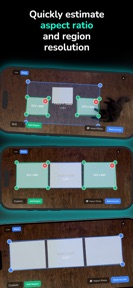
Projection Mapping Toolbox is a mobile utility for AV technicians to calculate projector placement and surface dimensions on iOS.
The App DNA
What makes this app unique?
It removes the need for desktop software or spreadsheets during on-site production setups, allowing technicians to perform complex layout calculations in the field.
For AV technicians and live production designers requiring on-site projection mapping and layout calculations.
What does it look like?
Key features
Imports technical floor plans to visualize projector photometrics, establishing professional-grade utility via architectural workflow integration.
Plans layouts with edge blending support, serving as a specialized tool for complex production environments.
Stores custom specifications for reuse, reducing time-to-value for repeat users by eliminating redundant data entry.
How much does it cost?
The app is currently offered as a free utility with no visible subscription or IAP gates, limiting its long-term sustainability.
Velocity
Maintenance developmentUX improvementsShow more...
The app currently operates in a maintenance state, with only one release shipped in the last 85 days. Development is focused exclusively on minor UI adjustments rather than new content or significant feature expansion. Given the 85-day gap since the latest release, the development momentum remains low and strictly reactive to maintenance needs.
Who built it?
User Sentiment
What do users think recently?
How are ratings & reviews evolving?
Not enough recent reviews to extract reliable themes yet.
Read the full review analysisCompetition
Competitive landscape for Projection Mapping Toolbox
How's the Utilities market?
Projection Mapping Toolbox serves a specialized professional segment within the Utilities category. With a 5-star rating from a small initial sample, the app's value rests on its CAD integration rather than broad market reach.
Read the market outlookThe rivals identified
Unlock the deeper market read.
Access the full report for freeThe Analyst's Read
Key takeaways for Projection Mapping Toolbox
Where is it heading?
The market for specialized AV utilities is consolidating around tools that offer seamless integration with existing architectural design workflows. Projection Mapping Toolbox is well-positioned to capture this segment if it shifts from a maintenance-only posture to a sustainable, revenue-generating model.
- The 86-day update gap suggests a maintenance-only cadence, which limits the app's ability to respond to new hardware or rival features.
- CAD PDF integration provides a defensible utility that serves as a high-value anchor for professional AV technicians.
The SWOT
- CAD PDF import integrates with architectural workflows
- Monetize advanced layout tools via professional tiers
Next best moves
Introduce a Pro tier for advanced multi-projector layouts because the current free model lacks revenue to sustain development → increase long-term viability.
+ 1 more prioritized moveThe counter-intuitive read
The lack of monetization is a liability, not a feature…
Read the full takeBottom line
Projection Mapping Toolbox provides high-utility CAD integration that anchors professional workflows, but the current maintenance-only cadence risks ceding the market to more active rivals. Prioritizing a monetization layer would secure the resources needed to sustain development and defend this niche.
Unlock 1 critical friction, 1 market threat, 1 more prioritized move and the analyst’s take.
Access the full report for freeFAQ
Is Projection Mapping Toolbox suitable for professional AV work?
Does Projection Mapping Toolbox cost money to use?
What are the limitations of the current version?
Sources
- [1] App Store, source
Report last updated