



Projector App & Screen Share is a mobile utility for mirroring documents and media to AirPlay and Chromecast-enabled displays.
The App DNA
What makes this app unique?
The app removes the need for dedicated presentation hardware by turning a mobile device into a remote-controlled projection hub.
For Professionals and students who need to project documents, web content, or media from mobile devices to external displays.
What does it look like?
Key features
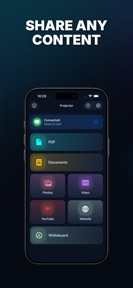
Streams photos, videos, and browser content to AirPlay and Chromecast devices.
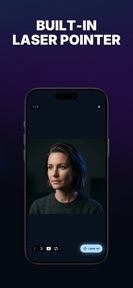
Virtual laser pointer and slideshow timer for document navigation.
Freehand drawing surface with photo overlay support.
How much does it cost?
The app is currently free to download with no explicit subscription or IAP tiers mentioned in the metadata.
Velocity
Maintenance developmentplatform expansionUX improvementsShow more...
The app maintains a maintenance-level cadence, with only one release shipped in the last 22 days. Development is currently focused on platform expansion and UX improvements, specifically targeting connectivity and device discovery. The latest update represents a significant functional addition rather than routine maintenance, though the overall release frequency remains low.
Who built it?
Manfred Kuegel
5 apps tracked · Utilities
 No Wifi Games
 Frequency Analyzer
 Walkie Talkie - Messenger
 Frequency Generator
User Sentiment
What do users think recently?
How are ratings & reviews evolving?
Not enough recent reviews to extract reliable themes yet.
Read the full review analysisCompetition
Competitive landscape for Projector App & Screen Share
How's the Utilities market?
Projector App & Screen Share occupies a niche in the utilities category, leveraging a 4.38 rating across 31 reviews to establish baseline trust. The lack of explicit monetization tiers suggests a focus on user acquisition over immediate revenue extraction.
The rivals identified
The Analyst's Read
Key takeaways for Projector App & Screen Share
Where is it heading?
The market for mobile-to-TV utilities is shifting toward native OS integration, which forces third-party apps to compete on specialized presentation features rather than basic connectivity. Projector App & Screen Share is well-positioned as a utility tool, but its lack of monetization and restrictive content rating leave it vulnerable to native solutions that are increasingly free and accessible.
- The latest release added Chromecast support, which expands the addressable hardware base and improves device discovery for users.
- The maintenance-mode release cadence suggests a stable, feature-complete product rather than an aggressive growth strategy for the coming quarter.
The SWOT
- Integrated laser pointer and whiteboard tools differentiate the mirroring workflow.
- Multi-protocol support (AirPlay and Chromecast) expands hardware compatibility.
- Introduce a Pro tier to capture value from professional users.
- Lower content rating to increase accessibility for student users.
Next best moves
Lower content rating to 4+ because the current 17+ rating blocks educational adoption → increase school-segment install velocity
+ 1 more prioritized moveThe counter-intuitive read
The app's 17+ content rating is a self-inflicted…
Read the full takeSince the last report: The report now quantifies the app's market position with a 4.38 rating across 31 reviews and elevates the 17+ content rating to a critical strategic barrier for educational market entry.
Bottom line
The app provides a functional presentation toolkit, but its lack of monetization and restrictive content rating cap its growth potential. Pivoting to an educational-friendly rating and introducing a Pro tier would unlock the professional and student segments it currently serves.
Unlock 2 critical frictions, 2 market threats, 1 more prioritized move and the analyst’s take.
Access the full report for freeFAQ
Is Projector App & Screen Share free to use?
Does this app work with Chromecast?
Can I use this app for school presentations?
Sources
- [1] App Store, source
Report last updated