


Proximator - Footage Converter
By Chenxing Liu


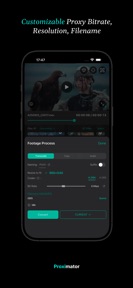


Proximator is a mobile footage review and proxy conversion tool for filmmakers, available on iOS.
The App DNA
What makes this app unique?
It removes the friction of carrying a laptop for on-set media management by enabling direct proxy generation and color grading on mobile hardware.
For Filmmakers and video creators who need to review, convert, and manage footage on-set using mobile devices.
What does it look like?
Key features
Uses a custom Metal pipeline to convert high-resolution camera footage into lightweight proxy files at up to 8x real-time speed.
Provides exposure, contrast, temperature, and tint adjustments, plus color wheels for live preview and baked-in output.
Burns timecode, scene, shot, and take information directly into the video or embeds it as metadata for NLE compatibility.
How much does it cost?
Monetization relies on a one-time purchase model for the Pro license, which is shared across iPad and iPhone devices.
Velocity
Active developmentmonetizationperformanceUX improvementsShow more...
Proximator maintains an active development pace, with two releases shipped in the last 19 days. The latest version focuses on resolving issues with Perpetual License and 1-Month Pass access, alongside performance improvements for MXF imports. This cadence suggests a stable development cycle centered on reliability and monetization stability. The app has seen two distinct versions in the current window, indicating consistent maintenance and refinement.
Who built it?
User Sentiment
What do users think recently?
How are ratings & reviews evolving?
Not enough recent reviews to extract reliable themes yet.
Read the full review analysisCompetition
Competitive landscape for Proximator - Footage Converter
How's the Photo & Video market?
Proximator occupies a specialized niche in the Photo & Video category by focusing on professional on-set proxy workflows rather than consumer-grade editing. Its value proposition rests on NLE compatibility and GPU-accelerated performance, which differentiates it from general-purpose media converters.
Read the market outlookThe rivals identified
Unlock the deeper market read.
Access the full report for freeThe Analyst's Read
Key takeaways for Proximator - Footage Converter
Where is it heading?
The market for on-set mobile tools is consolidating around high-performance proxy workflows and cloud-based collaboration. Proximator is well-positioned to serve this segment if it maintains its current release cadence and continues to prioritize NLE compatibility.
- Frequent stability updates demonstrate active development, which builds trust with professional users who rely on Proximator for on-set data integrity.
- The one-time purchase model requires a steady stream of new users to sustain development, as the app lacks recurring subscription revenue.
The SWOT
- GPU-accelerated Metal pipeline enables 8x real-time proxy conversion
- Slate and metadata burn-in ensures NLE compatibility
- Cloud integration supports remote collaboration workflows
- Expand cloud-sync integrations to capture more production teams
- Develop advanced color-grading presets for faster on-set looks
Next best moves
Ship expanded cloud-sync integrations because production teams require seamless remote collaboration → increase Pro license conversion
+ 1 more prioritized moveThe counter-intuitive read
The lack of a subscription model is a strategic advantage for Proximator…
Read the full takeBottom line
Proximator defends its professional niche through GPU-accelerated performance and NLE-ready metadata tools. Focusing on cloud-sync reliability will unlock further adoption among production teams, ensuring the app remains a primary tool for on-set media management.
Unlock 2 critical frictions, 2 market threats, 1 more prioritized move and the analyst’s take.
Access the full report for freeFAQ
Is Proximator suitable for professional film sets?
Does Proximator require a subscription?
What file formats does Proximator support?
Can I use Proximator without a laptop?
Sources
- [1] App Store
Report last updated