


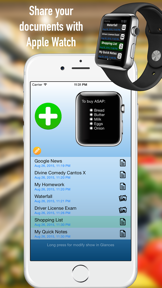


Push to Watch is a productivity utility for iOS and Apple Watch that transfers text and images for offline viewing.
The App DNA
What makes this app unique?
Users need to access specific reference materials on their wrist without the friction of unlocking their iPhone during activities like gym sessions or testing.
For Apple Watch users who need to access text documents, web articles, or images on their wrist without unlocking their iPhone.
What does it look like?
Key features
Transfers text documents, images, and photos from iPhone to Apple Watch.
Downloads text content from internet links for offline reading on Apple Watch.
Adjusts font size and zooms images directly on the Apple Watch interface.
How much does it cost?
The app uses a restrictive one-item limit to gate functionality, though the specific paid-tier pricing is not disclosed in the metadata.
Velocity
Maintenance developmentUX improvementsperformanceShow more...
The app currently operates on a maintenance cadence, shipping approximately one update every 48 days. Development is focused on technical refinements, including improved error messaging, notification reliability for slower hardware, and the introduction of diagnostic logging tools. There is no evidence of a shift toward live operations or rapid feature iteration. The current development trend remains stable, prioritizing bug fixes and user-reported troubleshooting over new content.
Who built it?
Stefano Russello
6 apps tracked · Productivity
 FlyToDiscover - Bebop
 PDF Watch Viewer
 Barcode Organizer
 Wake up! Earthquake LITE
 Wake up! Earthquake
User Sentiment
What do users think recently?
Recent user voice shows a mixed sentiment. Users appreciate the low price point makes the app a high value purchase for users seeking specific utility and the core functionality of transferring text and images to a watch provides a unique utility.
How are ratings & reviews evolving?
What users say, by theme
- The low price point makes the app a high value purchase for users seeking specific utility
- The core functionality of transferring text and images to a watch provides a unique utility
- Connection failures between the phone and watch disrupt the intended workflow for many users
5 of 5 recent reviews analyzed · limited sample
Read the full review analysisUnlock 2 more frustration themes and 1 user request, each backed by review evidence.
Access the full report for freeCompetition
Competitive landscape for Push to Watch
How's the Productivity market?
Push to Watch holds a 3-star rating across 12 total ratings. The lack of recent major updates and the restrictive one-item transfer limit place it in a maintenance-mode position within the Productivity category.
Read the market outlookThe rivals identified
Unlock the deeper market read.
Access the full report for freeThe Analyst's Read
Key takeaways for Push to Watch
Where is it heading?
The market for dedicated watch-transfer utilities is shrinking as native OS features improve. Push to Watch remains exposed due to its maintenance-only cadence and lack of core workflow stability, which will likely lead to further rating erosion.
- The 48-day update cadence without feature expansion suggests the developer has moved the app to maintenance mode.
- Persistent connection failures between the phone and watch erode user trust, leading to negative sentiment and low ratings.
The SWOT
- Offline-first design removes connectivity dependency
- Add multi-file storage to improve retention
Next best moves
Ship multi-file storage because it is the top-requested feature → increase long-term utility
+ 1 more prioritized moveThe counter-intuitive read
The one-item transfer limit is not a monetization…
Read the full takeSince the last report: The outlook for Push to Watch has downgraded from mixed to declining, reflecting increased concern that the app's maintenance-only cadence and unresolved connection issues are rendering it obsolete against native platform capabilities.
Bottom line
The one-item transfer limit and connection instability prevent Push to Watch from becoming a daily utility. Addressing file management would unlock higher retention, as the current friction forces users to recreate content repeatedly.
Unlock 3 critical frictions, 1 market threat, 1 more prioritized move and the analyst’s take.
Access the full report for freeFAQ
Is Push to Watch free to use?
Does Push to Watch work without an internet connection?
Why can't I rename my files in the app?
Sources
- [1] App Store, source
Report last updated