



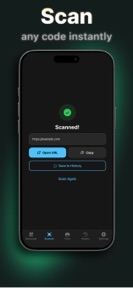


QR Code Maker: Sticker Print is a utility for generating, scanning, and printing custom QR codes onto Avery label templates on iOS.
The App DNA
What makes this app unique?
The app removes the manual formatting friction involved in aligning digital QR codes with physical sticker sheets for business or event use.
For Small business owners and home users needing to create and print physical QR code labels for products or events.
What does it look like?
Key features
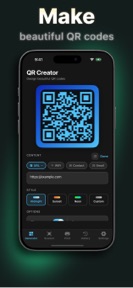
Renders QR codes from URL, text, or WiFi credentials with live preview.
Formats QR codes for specific Avery label templates for AirPrint. RevenueLink: Premium-tier gate targets business users requiring physical asset labeling.
Applies color gradients and icons to QR codes. RevenueLink: Premium-tier gate restricts advanced styling to paid users.
How much does it cost?
The freemium model gates advanced design, bulk printing, and history features behind a subscription or one-time purchase to drive conversion.
Velocity
Maintenance developmentperformanceopaqueShow more...
The app maintains a maintenance-level cadence, shipping approximately one release every 8.5 weeks. Development activity is limited to minor bug fixes and general improvements, with no evidence of new features or live-service content. The latest release continues this pattern of opaque, stability-focused updates. Given the current frequency, the app remains in a state of low-intensity support.
Who built it?
Foster Apps
3 apps tracked · Utilities
 Home Maintenance & Checklist
 Migraine Tracker Pressure Pal
User Sentiment
What do users think recently?
How are ratings & reviews evolving?
Not enough recent reviews to extract reliable themes yet.
Read the full review analysisCompetition
Competitive landscape for QR Code Maker: Sticker Print
How's the Utilities market?
QR Code Maker: Sticker Print occupies a niche in the Utilities category by focusing on physical label printing. The lack of recent feature updates suggests a maintenance-mode posture that may limit growth against more active competitors.
Read the market outlookThe rivals identified
Unlock the deeper market read.
Access the full report for freeThe Analyst's Read
Key takeaways for QR Code Maker: Sticker Print
Where is it heading?
The market for QR utilities is consolidating around apps that offer both high-speed scanning and physical-labeling workflows. QR Code Maker: Sticker Print remains stable but exposed, as the lack of active feature development prevents it from building a stronger barrier against general-purpose scanners.
- The 60-day update cadence indicates a maintenance-mode posture, which limits the ability to respond to competitive feature shifts in the Utilities space.
The SWOT
- Avery label template integration removes manual formatting friction
- Expanding template library to capture professional-labeling segments
Next best moves
Expand Avery template library because the current selection is the primary differentiator → increase professional-user retention
The counter-intuitive read
The app's strength is not the QR generation, but the physical-print workflow…
Read the full takeBottom line
Expanding the Avery template library would defend the professional-labeling niche, as the current maintenance-mode cadence leaves the user base vulnerable to more active competitors.
Unlock 1 critical friction, 1 market threat and the analyst’s take.
Access the full report for freeFAQ
Is QR Code Maker: Sticker Print free to use?
Can I print QR codes directly from the app?
Does this app work for business labeling?
Sources
- [1] App Store, source
Report last updated