

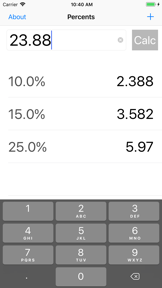


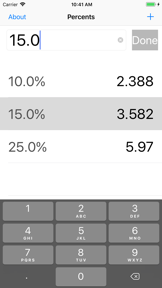
Quick Percents is a utility app for iOS that allows users to calculate and manage custom percentage lists with a large-font interface.
The App DNA
What makes this app unique?
Users hire this app for rapid, low-friction percentage math that avoids the complexity of full scientific calculators.
For Users who require a fast, accessible tool for performing frequent percentage calculations on the go.
What does it look like?
Key features
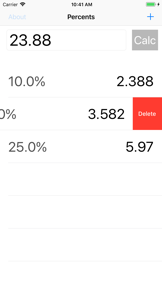
Users add, edit, and delete specific percentage values to tailor the calculation list to their needs.
Large font design ensures readability and ease of use for quick calculations.
Entries are removed from the list using a swipe-left gesture.
How much does it cost?
The app is entirely free with no visible monetization, suggesting it is a legacy project rather than a commercial product.
Velocity
Steady developmentShow more...
Who built it?
Brainwash
5 apps tracked · Utilities
 Leaky Faucet Drip Calculator
 Pray 4 Today - Prayer Journal
 Pumbuzzle
 5Today
User Sentiment
What do users think recently?
How are ratings & reviews evolving?
Not enough recent reviews to extract reliable themes yet.
Read the full review analysisCompetition
Competitive landscape for Quick Percents
How's the Utilities market?
Quick Percents occupies the basic utility space with a stagnant 2018 codebase, leaving it exposed to modern rivals that offer persistent history logs.
Read the market outlookThe rivals identified

By 7th Gear
This app dominates the utility space by offering a comprehensive, high-precision math suite that directly competes with Quick Percents' simple calculation use case.
- Offers a full scientific calculator suite that dwarfs this app's basic percentage-only functionality.
- Includes a dedicated notes and drawing tab, providing a multi-functional workspace for power users.
- Maintains a massive user base and high-precision math engine, establishing a strong brand-as-category moat.
 Aspect Ratio ProContender
 Dash Calc: Simple Fast MathContender
 Torispherical Tank CalculatorContender
 Fractions Calculator LargeContender
Unlock the head-to-head verdict: where this rival wins, and where it loses.
Access the full report for freeThe Analyst's Read
Key takeaways for Quick Percents
Where is it heading?
The utility market is consolidating around apps that offer multi-functional workspaces and persistent history logs. Quick Percents remains exposed due to its stagnant release cadence, so the PM must modernize the feature set to prevent further churn to active competitors.
- The lack of updates since 2018 signals a maintenance-mode posture, which allows modern competitors to capture the utility-seeking audience.
The SWOT
- Large-font interface ensures high readability for quick-glance utility
- Adding a persistent history log would bridge the primary utility gap against category leaders
Next best moves
Ship persistent history log because it is the primary utility gap against category leaders → increase retention
The counter-intuitive read
The app's lack of monetization and stagnant update…
Read the full takeFeature gaps
Persistent history log (available in Calculator for iPad! but missing here)
Since the last report: The analysis sharpened its focus on the persistent history log as the primary utility gap and refined the SWOT and contrarian perspectives to better reflect the app's legacy status.
Bottom line
Quick Percents maintains a clean, frictionless interface for basic math, but its lack of persistent history and stagnant development cycle limit its utility against modern rivals, so the PM should prioritize a history-log update to defend the user base.
Unlock 1 critical friction, 1 market threat and the analyst’s take.
Access the full report for freeSources
- [1] App Store, source
Report last updated