


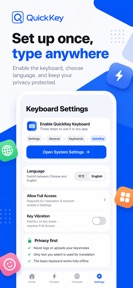


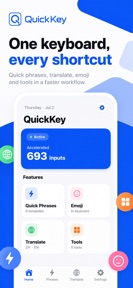
QuickKey is a bilingual Chinese and English keyboard for iOS that integrates translation, emoji, and phrase templates into a single interface.
The App DNA
What makes this app unique?
The app removes the privacy friction of cloud-based keyboards by generating all word suggestions and translations entirely on the device.
For Bilingual Chinese and English speakers who require efficient, privacy-focused text input.
What does it look like?
Key features
Supports 9-key T9 and full keyboard layouts with sliding letter selection, increasing daily active usage.
Categorized message templates synced via iCloud, creating a lock-in effect for power users.
In-keyboard translation eliminates app switching, driving high-frequency engagement.
On-device suggestion generation acts as a moat against cloud-based competitors.
How much does it cost?
QuickKey is currently free with no visible IAP or subscription gates.
Velocity
Maintenance developmentopaqueShow more...
QuickKey - Smart Keyboard currently operates on a maintenance cadence, with only one release identified in the recent window. The latest release occurred 46 days ago, indicating a lack of active feature development or live operations. The development team has provided no specific release notes, leaving the focus of the latest update opaque. Given the current release frequency, the app shows no signs of active iteration or content expansion.
Who built it?
User Sentiment
What do users think recently?
How are ratings & reviews evolving?
Not enough recent reviews to extract reliable themes yet.
Read the full review analysisCompetition
Competitive landscape for QuickKey - Smart Keyboard
How's the Utilities market?
QuickKey occupies the privacy-focused utility segment, currently maintaining a free-to-use model without IAP gates. The 46-day update cadence indicates a stable, maintenance-focused position rather than aggressive market expansion.
Read the market outlookThe rivals identified
Unlock the deeper market read.
Access the full report for freeThe Analyst's Read
Key takeaways for QuickKey - Smart Keyboard
Where is it heading?
The keyboard utility market is consolidating around apps that offer both privacy and high-frequency feature updates. QuickKey's current maintenance posture leaves it exposed to competitors who can iterate faster, so the PM must introduce a monetization layer to fund active development.
- The 46-day release cadence suggests the product is in maintenance mode, which limits the ability to respond to market shifts.
The SWOT
- On-device processing replaces cloud-based data dependency
- Optional subscription tiers for advanced template syncing
Next best moves
Ship optional Pro subscription tier because the current free model lacks revenue levers → unlock sustainable development funding
The counter-intuitive read
Users report: The lack of cloud-based data collection…
Read the full takeSince the last report: QuickKey maintains its existing feature set and free-to-use pricing model without material updates. The product remains in a maintenance-only state with no changes to its core utility or market positioning.
Bottom line
QuickKey's privacy-first mechanism provides a clear differentiator, but the current maintenance-only cadence limits its growth potential. Introducing a monetization layer would unlock the resources needed to compete with more active keyboard utilities.
Unlock 1 critical friction, 1 market threat and the analyst’s take.
Access the full report for freeFAQ
Is QuickKey safe for my private data?
Does QuickKey cost money to use?
What makes QuickKey different from standard keyboards?
Sources
- [1] App Store, source
Report last updated