


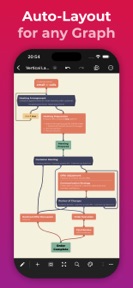


QuikFlow is a flowchart and mind-mapping tool for knowledge workers and students, focused on automated layout and rich-text node expansion on iOS.
The App DNA
What makes this app unique?
The app removes the cognitive cost of manual diagram alignment, allowing users to brainstorm at the speed of typing.
For Knowledge workers and students who need to create flowcharts and mind maps with integrated task management.
What does it look like?
Key features
Automatic node positioning and relationship management that adjusts flowcharts during editing.
Nodes expand into documents containing headlines, lists, images, links, and checklists.
Export diagrams to PDF, PNG, OPML, Markdown, Mermaid, and JSON.
How much does it cost?
The freemium model provides core layout features for free, while gating advanced document content and export formats behind a $29.99 lifetime or subscription option.
Velocity
Maintenance developmentinternationalizationUX improvementsShow more...
QuikFlow is currently in a maintenance phase, having shipped only one release in the last 160 days. The latest version introduced several export options and UI localizations, but there has been no subsequent development activity. The development trend is stagnant, with no evidence of ongoing feature iteration or live operations. The app remains in a maintenance state as of July 2026.
Who built it?

User Sentiment
What do users think recently?
Fresh user feedback skews thrilled. Users appreciate the minimalist interface allows users to map complex thoughts without the distraction of complex feature sets and automatic layout adjustments during node creation enable rapid brainstorming sessions for busy professionals and students.
How are ratings & reviews evolving?
What users say, by theme
- The minimalist interface allows users to map complex thoughts without the distraction of complex feature sets
- Automatic layout adjustments during node creation enable rapid brainstorming sessions for busy professionals and students
- The lifetime purchase model provides high value for users who prefer avoiding recurring subscription costs
- The lack of vertical flow orientation forces users to scroll horizontally, complicating document printing and viewing
12 of 12 recent reviews analyzed · moderate confidence · Thrilled overall
Read the full review analysisUnlock 1 more frustration theme and 2 user requests, each backed by review evidence.
Access the full report for freeCompetition
Competitive landscape for QuikFlow: Flowchart & Mind Map
How's the Productivity market?
QuikFlow maintains a focused position in the productivity category by prioritizing layout automation over feature bloat. The 5-star rating across 4 reviews suggests high satisfaction among the current user base, though the lack of vertical orientation limits its appeal for professional document printing.
Read the market outlookThe rivals identified
Unlock the deeper market read.
Access the full report for freeThe Analyst's Read
Key takeaways for QuikFlow: Flowchart & Mind Map
Where is it heading?
The productivity market is consolidating around tools that balance simplicity with professional-grade output. QuikFlow's maintenance-mode cadence leaves it exposed to rivals that offer more robust formatting tools, which will erode its lead if professional-grade layout and image support remain unaddressed.
- The lifetime purchase model provides a clear value proposition that drives conversion without the friction of recurring subscriptions.
- The lack of vertical layout support and image insertion forces professional users to secondary software, which limits long-term retention.
The SWOT
- Interactive layout algorithms reduce manual diagramming friction
- Lifetime purchase model drives conversion among cost-conscious users
- Vertical flow orientation would address primary printing complaints
- Native image support would capture users currently using secondary software
Next best moves
Ship vertical layout support because it is the top-requested layout fix for printing/viewing → improve professional utility
+ 1 more prioritized moveThe counter-intuitive read
The minimalist feature set is not a weakness but a retention lever…
Read the full takeBottom line
QuikFlow's automatic layout engine effectively captures the rapid-ideation market, but the lack of vertical orientation and image support creates a ceiling for professional adoption. Addressing these layout limitations would unlock the professional segment currently forced to use secondary software for final presentations.
Unlock 2 critical frictions, 1 market threat, 1 more prioritized move and the analyst’s take.
Access the full report for freeFAQ
Is QuikFlow suitable for professional presentations?
Does QuikFlow offer a lifetime purchase option?
Can I print my flowcharts easily?
Sources
- [1] App Store, source
Report last updated