


RAWCraft: LUT Photo Editor


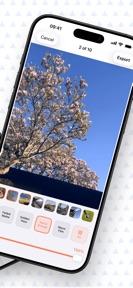

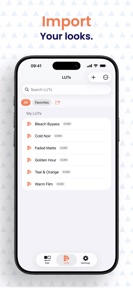

RAWCraft is a photo-editing utility for iPhone Pro users that applies custom LUTs and XMP presets to Apple ProRAW files.
The App DNA
What makes this app unique?
It removes the friction of cloud-based processing for professional color grading, allowing photographers to apply their existing look-libraries to RAW files locally.
For Professional photographers and enthusiasts using iPhone Pro models who prefer one-time purchase software over subscriptions.
What does it look like?
Key features
Imports .cube and .xmp files for application to ProRAW photos.
Applies looks and exports multiple photos in a single pass.
Develops ProRAW files using Apple Metal engine without cloud uploads.
How much does it cost?
The $14.99 one-time purchase model acts as a direct conversion lever for power users, while the free tier serves as a trial.
Velocity
Maintenance developmentnew contentUX improvementsShow more...
RAWCraft: LUT Photo Editor currently operates at a maintenance cadence, with only one release recorded in the recent window. The latest update introduced a small content addition of 10 free LUTs, marking the only activity in the last 9 days. Development appears focused on minor content expansion rather than frequent feature iteration. The app has seen no other updates during this period, suggesting a stable but slow development cycle.
Who built it?
User Sentiment
What do users think recently?
How are ratings & reviews evolving?
Not enough recent reviews to extract reliable themes yet.
Read the full review analysisCompetition
Competitive landscape for RAWCraft: LUT Photo Editor
How's the Photo & Video market?
RAWCraft occupies a specialized niche in the Photo & Video category, focusing on ProRAW workflows for users who reject subscription-based cloud editors.
Read the market outlookThe rivals identified
Unlock the deeper market read.
Access the full report for freeThe Analyst's Read
Key takeaways for RAWCraft: LUT Photo Editor
Where is it heading?
The professional photo-editing market is shifting toward local-first privacy, which favors RAWCraft's current architecture. If the developer maintains the current update cadence, the app will remain a stable choice for power users, though it must expand its feature set to prevent larger, subscription-based rivals from absorbing its niche.
- The latest release added 10 free LUTs, indicating active feature investment rather than pure maintenance mode.
- The current one-time purchase model limits the user funnel, requiring higher conversion rates from the free trial to sustain growth.
The SWOT
- Metal-based local processing ensures privacy and zero-latency editing
- One-time purchase model provides a clear value proposition for professional users
- Building a preset-sharing community could create a defensible network effect
Next best moves
Ship a preset-sharing community feature because it would create a network effect that currently does not exist → increase retention
The counter-intuitive read
The one-time purchase model is not a weakness but a retention lever…
Read the full takeSince the last report: The developer has shifted from a maintenance-only posture to an active investment strategy, prioritizing the creation of a preset-sharing community to build network effects.
Bottom line
RAWCraft defends its position by prioritizing local performance over cloud-based convenience, but the one-time purchase model limits the top-of-funnel conversion. Focusing on batch-processing efficiency would better serve the professional segment that justifies the $14.99 price point.
Unlock 1 critical friction, 1 market threat and the analyst’s take.
Access the full report for freeFAQ
Is RAWCraft suitable for casual photo editing?
Does RAWCraft require a subscription?
What is the main advantage of RAWCraft over cloud-based editors?
Can I use my own presets in RAWCraft?
Sources
- [1] App Store
Report last updated