


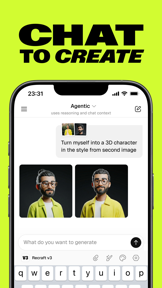


Recraft is a design-focused AI generator for mobile and desktop that produces both raster images and scalable vector graphics.
The App DNA
What makes this app unique?
Designers use Recraft to bypass manual drawing for logos and icons, replacing expensive vector-editing software with automated generation workflows.
For Designers, social media creators, and professionals requiring both raster and vector AI-generated assets.
What does it look like?
Key features
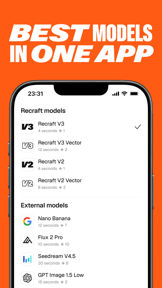
Provides generation via internal models like Recraft V4 and external models including Flux and Kling, driving subscription conversion.
Produces scalable SVG files for logos and icons, increasing switching costs for creative users.
Automates context reasoning and parameter optimization, increasing session frequency for non-expert users.
How much does it cost?
The freemium model gates high-compute model access and professional-grade design tools to drive subscription conversion.
Velocity
Steady developmentUX improvementsplatform expansionnew contentShow more...
Recraft maintains a steady development pace with 2 distinct versions released in the observed window. The latest release focuses on feature parity between desktop and mobile, alongside expanded creative tools like background removal and vectorization. Development is currently centered on UX improvements and platform integration, with updates shipping consistently across both iOS and Android platforms. The app has seen updates within the last 5 to 8 days, indicating active maintenance and feature expansion.
Who built it?
recraft
2 apps tracked · Graphics & Design
 Recraft: AI Images and Videos
User Sentiment
What do users think recently?
Review voice lately leans mixed. Users appreciate vector-based design tools allow professional artists to maintain high quality output across mobile and desktop and generative ai capabilities enable users to visualize creative concepts without requiring advanced manual drawing skills, but report application launch failures and black screens prevent users from accessing the interface after recent updates.
How are ratings & reviews evolving?
Weekly average review rating
What users say, by theme
- Vector-based design tools allow professional artists to maintain high quality output across mobile and desktop
- Generative AI capabilities enable users to visualize creative concepts without requiring advanced manual drawing skills
- Ad-free experience during the creative process allows for uninterrupted focus on design tasks
- Application launch failures and black screens prevent users from accessing the interface after recent updates
65 of 88 recent reviews analyzed · high confidence · Mixed overall
Read the full review analysisUnlock 2 more frustration themes and 1 user request, each backed by review evidence.
Access the full report for freeCompetition
Competitive landscape for Recraft: AI Images and Videos
How's the Graphics & Design market?
Recraft holds a specialized position in the Graphics & Design category, focusing on professional vector output rather than casual art. The 4.78 rating on iOS contrasts with the 4.21 rating on Android, signaling that the current UI regressions disproportionately impact the Android user experience.
Read the market outlookThe rivals identified
Unlock the deeper market read.
Access the full report for freeThe Analyst's Read
Key takeaways for Recraft: AI Images and Videos
Where is it heading?
The generative design market is consolidating around tools that bridge the gap between AI-art and production-ready assets. Recraft's focus on vector output positions it well, but the current technical instability must be resolved to prevent professional users from migrating to more stable, albeit less specialized, alternatives.
- Persistent launch failures and UI regressions in the latest release erode the daily active habit, which compounds the rating drag on Android.
- The introduction of cross-platform project syncing demonstrates active feature investment that aligns with the needs of professional design workflows.
The SWOT
- Native vector (SVG) generation creates high switching costs for professional designers.
- Cross-platform project syncing enables continuous workflows between mobile and desktop.
- Dual-mode interface (Agentic vs. Manual) serves both novice and expert creative needs.
- Expanding the tablet-specific UI to include full desktop toolkits would capture professional creative segments.
- Developing a dedicated offline-caching layer for projects would mitigate current launch-stability complaints.
Next best moves
Rebuild the tablet navigation layer because UI regressions block essential editing tools → restore professional-grade usability
+ 1 more prioritized moveThe counter-intuitive read
The shift toward a pay-to-generate model is not just a monetization move…
Read the full takeSince the last report: Recraft has refined its market positioning to address platform-specific performance disparities and clarified the rationale behind its current monetization strategy.
Bottom line
Recraft's vector-first capability provides a defensible position in the design market, but technical instability in the latest release is currently eroding the professional user base. Addressing the launch-crash and navigation regressions will unlock the retention needed to sustain the premium subscription model.
Unlock 3 critical frictions, 2 market threats, 1 more prioritized move and the analyst’s take.
Access the full report for freeFAQ
Is Recraft suitable for professional logo design?
How does Recraft compare to standard AI image generators?
Are there limitations to the free version of Recraft?
Sources
Report last updated