


Redact — Censor & Blur Photos
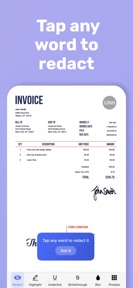


Redact is a privacy-focused redaction tool for images and PDFs that uses on-device AI to detect and mask sensitive text.
The App DNA
What makes this app unique?
The app removes the security risk of cloud-based processing for users handling sensitive legal or medical documents, displacing general-purpose blur tools that lack permanent data-burning capabilities.
For Professionals and individuals needing to sanitize sensitive documents, screenshots, or photos before sharing them online.
What does it look like?
Key features
Automated identification of sensitive data including SSNs and license plates, serving as the primary acquisition lever.
Automatic detection and redaction of repeated terms across all document pages, acting as a retention lever.
Local execution of all tasks without cloud uploads, serving as the core brand moat.
How much does it cost?
The one-time purchase model avoids recurring subscription fees, appealing to users who prefer ownership over access.
Velocity
Steady developmentmonetizationUX improvementsShow more...
With two releases in the last 19 days, the app maintains a steady development pace. The latest update shifted the monetization strategy by removing subscription requirements and introducing a one-time purchase for unlimited exports. Development is currently focused on refining the core feature set and adjusting the business model. The cadence remains consistent, with recent updates providing clear functional changes rather than generic maintenance.
Who built it?
Nikolay Strikhar
6 apps tracked · Photo & Video
 Sudoku Murder: Mystery Games
 Darts Score Tracker & Counter
 Tarot Card Meanings & Reading
 Runes: Learn Norse
 Body Measurement Tracker — Bod
User Sentiment
What do users think recently?
How are ratings & reviews evolving?
Not enough recent reviews to extract reliable themes yet.
Read the full review analysisCompetition
Competitive landscape for Redact — Censor & Blur Photos
How's the Photo & Video market?
Redact occupies a niche in the Photo & Video category, focusing on privacy-centric document sanitization rather than general editing. The one-time purchase model differentiates Redact from subscription-heavy competitors, though the 3-export limit on the free tier creates a high barrier for casual users.
Read the market outlookThe rivals identified
Unlock the deeper market read.
Access the full report for freeThe Analyst's Read
Key takeaways for Redact — Censor & Blur Photos
Where is it heading?
The document-sanitization market is shifting toward AI-integrated tools, and Redact is well-positioned to serve the privacy-conscious segment. Continued focus on on-device processing will maintain the brand moat, but the app must address multi-device workflow gaps to remain competitive against broader PDF editors.
- The transition to a one-time purchase model aligns with user demand for ownership, potentially increasing long-term Pro conversion rates.
- The current release cadence is steady, focusing on monetization adjustments rather than major feature expansion, which maintains stability but limits growth.
The SWOT
- On-device processing eliminates cloud-based data-leakage risks
- Smart Match propagation reduces manual processing time
- Integration with file-management apps could increase professional visibility
Next best moves
Ship cloud-sync for document gallery because it is a top barrier for multi-device professionals → increase Pro conversion
+ 1 more prioritized moveThe counter-intuitive read
The one-time purchase model is a strategic advantage, not a weakness…
Read the full takeBottom line
Redact defends its position through on-device privacy, but the lack of cloud-sync limits its utility for professional workflows. Implementing cross-device document access would unlock the professional segment, justifying the one-time purchase price and reducing churn among power users.
Unlock 2 critical frictions, 1 market threat, 1 more prioritized move and the analyst’s take.
Access the full report for freeFAQ
Is Redact safe for sensitive legal or medical documents?
How does Redact compare to standard blur tools?
Is there a free version of Redact available?
What are the alternatives to Redact for document redaction?
Sources
- [1] App Store
Report last updated