





Remote Control for Samsung TV is a mobile remote utility for Samsung Smart TVs, providing touchpad and keyboard input on iOS and Android.
The App DNA
What makes this app unique?
The app removes the cognitive friction of using a physical remote for text-heavy tasks like searching for content in Smart Hub applications.
For Samsung Smart TV owners (Series F and later) looking for a mobile-based alternative to physical remotes for easier text entry and navigation.
What does it look like?
Key features
Large virtual touchpad for menu navigation and game control.
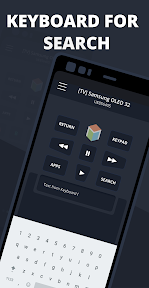
On-screen mobile keyboard for text input in supported Smart Hub applications.
Restores TV connection automatically after interruptions.
How much does it cost?
The freemium model gates advanced interaction tools like the touchpad and keyboard behind an annual subscription, while maintaining an ad-supported free tier.
Velocity
Intense developmentShow more...
5 versions in history. Development pace: intense.
Who built it?
KRAFTWERK 9
13+ apps tracked · Tools
 Universal TV Remote ·
 Remotie: remote for Samsung TV
 Remote for Philips TV
 Hisvi - Remote for Hisense TV
 Remote for Apple TV
 Remote for LG Smart TV
 Remote for Chromecast TV
 Remote for Firestick & Fire TV
 Remote for Vizio Smart TV
 Remote for Sony Bravia TV
 Remote Control for TCL Roku TV
 Smartify - LG TV Remote
User Sentiment
What do users think recently?
How are ratings & reviews evolving?
Not enough recent reviews to extract reliable themes yet.
Read the full review analysisCompetition
Competitive landscape for Remote Control for Samsung TV
How's the Tools market?
Remote Control for Samsung TV maintains a stable presence in the Tools category, though it faces direct competition from the official Samsung Smart View application. The $19.99/year subscription tier positions the app as a premium utility, which may limit adoption compared to free, first-party alternatives.
Read the market outlookThe rivals identified
Unlock the deeper market read.
Access the full report for freeThe Analyst's Read
Key takeaways for Remote Control for Samsung TV
Where is it heading?
The market for smart TV remotes is consolidating around first-party apps, leaving third-party utilities like Remote Control for Samsung TV to compete on niche features like Wear OS integration. Maintaining this position requires balancing the subscription barrier against the need for high-frequency user engagement.
- The consistent update cadence ensures compatibility with newer Samsung TV series, maintaining the app's relevance in a crowded utility market.
- Reliance on a high-cost annual subscription creates a conversion ceiling that limits growth against free, first-party remote alternatives.
The SWOT
- Wear OS integration provides a unique device-level convenience barrier.
- Automatic reconnection logic reduces session friction for ad-supported users.
- Localized pricing could capture users in emerging markets.
Next best moves
Pivot the premium tier to a monthly micro-subscription because the $19.99/year gate is a high barrier for casual users → increase conversion velocity.
+ 1 more prioritized moveThe counter-intuitive read
The $19.99 annual subscription is not a monetization…
Read the full takeSince the last report: The app implemented a $19.99/year freemium subscription model, gating core navigation tools behind a paywall and shifting its market position from a free utility to a premium-priced alternative.
Bottom line
Transitioning to a lower-friction pricing model would unlock the conversion funnel for casual users who currently bounce at the $19.99 annual paywall, directly addressing the primary barrier to scaling the user base against first-party alternatives.
Unlock 2 critical frictions, 1 market threat, 1 more prioritized move and the analyst’s take.
Access the full report for freeFAQ
Is Remote Control for Samsung TV compatible with all Samsung TVs?
Does the app work with Netflix and YouTube?
What is the difference between the free and premium versions?
Is there a free alternative to this app?
Sources
- [1] App Store, source
Report last updated