


Remote Mac Desktop Control


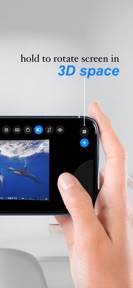
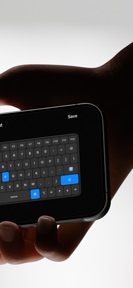

Remote Mac Desktop Control is a utility app that turns an iPhone or iPad into a wireless trackpad, keyboard, and screen viewer for macOS.
The App DNA
What makes this app unique?
The app removes the friction of physical peripheral dependency for Mac users who need to manage their desktop from a distance.
For Mac users seeking to control their desktop remotely or use their iPhone as a secondary input device for presentations and media.
What does it look like?
Key features
Mirrors Mac screen onto a curved virtual display with motion-tracked head movement using the iPhone gyroscope.
Simulates Mac cursor control with support for momentum scrolling, gestures, and click-and-drag.
Optional encrypted connection for accessing the Mac from outside the local network.
How much does it cost?
The freemium model gates remote internet access and high-quality streaming behind a subscription, serving as the primary conversion lever.
Velocity
Maintenance developmentUX improvementsperformanceShow more...
The app maintains a maintenance-level cadence, shipping only one release in the last two months. Development is currently focused on UX improvements and streamlining the initial setup process for new users. Given the current pace of one release every 59 days, the app shows no signs of high-frequency feature iteration or live-service operations. Future updates are expected to continue at this slow, stability-focused interval.
Who built it?
Amon Chowdhury
3 apps tracked · Utilities
 Expense AI: Budget Tracker
 UglyPDF: AI PDF Editor & Maker
User Sentiment
What do users think recently?
Fresh user feedback skews thrilled. Users appreciate wireless remote control functionality allows users to manage their desktop environment from anywhere in the house and high resolution streaming options provide a clear visual experience for users who upgrade to the premium tier.
How are ratings & reviews evolving?
What users say, by theme
- Wireless remote control functionality allows users to manage their desktop environment from anywhere in the house
- High resolution streaming options provide a clear visual experience for users who upgrade to the premium tier
1 of 1 recent reviews analyzed · limited sample
Read the full review analysisUnlock 1 user request, each backed by review evidence.
Access the full report for freeCompetition
Competitive landscape for Remote Mac Desktop Control
How's the Utilities market?
Remote Mac Desktop Control occupies a niche in the Utilities category, relying on a 5.0-star rating to build initial trust. The lack of frequent updates compared to category incumbents suggests a maintenance-focused posture rather than aggressive growth.
Read the market outlookThe rivals identified
Unlock the deeper market read.
Access the full report for freeThe Analyst's Read
Key takeaways for Remote Mac Desktop Control
Where is it heading?
The market for desktop control utilities is shifting toward cloud-integrated, cross-platform solutions. Remote Mac Desktop Control remains advantaged in the privacy-conscious segment, but the lack of frequent updates leaves it vulnerable to rivals that offer more robust remote access features.
- High user satisfaction with wireless control functionality suggests the core utility is well-aligned with user needs.
- The current maintenance-mode release cadence limits the app's ability to compete with more frequently updated remote desktop utilities.
The SWOT
- QR-based pairing with certificate pinning reduces setup friction
- Remote internet access expansion addresses top user request
Next best moves
Ship remote internet control features because user requests for extended range are high → increase premium conversion
+ 1 more prioritized moveThe counter-intuitive read
The app's maintenance-mode cadence is a strategic choice to preserve the high-trust…
Read the full takeBottom line
Remote Mac Desktop Control relies on a high-trust, privacy-first pairing mechanism to retain its user base. Prioritizing the requested remote internet access would unlock the conversion funnel for power users who currently find the local-only limitation a barrier.
Unlock 1 critical friction, 1 market threat, 1 more prioritized move and the analyst’s take.
Access the full report for freeFAQ
Is Remote Mac Desktop Control safe to use?
Does Remote Mac Desktop Control work away from home?
What is the difference between the free and premium versions?
Sources
- [1] App Store
Report last updated