


Remote Mouse, keyboard, more


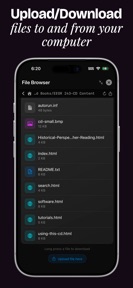




AndroMouse is a productivity tool that converts mobile devices into wireless mouse, keyboard, and media remotes for desktop computers.
The App DNA
What makes this app unique?
Users open AndroMouse to bypass the need for physical peripherals when controlling media PCs or presentations from a distance.
For Users seeking to control media PCs, presentations, or headless computer setups from a mobile device.
What does it look like?
Key features
Connects phone to computer as a HID device without server software or WiFi.
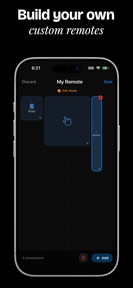
Drag-and-drop interface to create personalized button layouts and macros.
Streams computer display to the mobile device in real-time over WiFi.
How much does it cost?
Monetization relies on a one-time purchase model to unlock advanced utilities, avoiding recurring subscription costs.
Velocity
Maintenance developmentperformanceUX improvementsShow more...
With only two releases identified in the recent window, the app maintains a maintenance-level cadence of approximately one update every 2.5 months. Development is currently focused on addressing technical debt, including crash resolutions and connectivity improvements. While the Android platform received a functional update recently, the iOS version has remained stagnant for 150 days. The development trend is stable but minimal, prioritizing bug fixes over new feature expansion.
Who built it?
Suraj Bhattarai
3 apps tracked · Productivity
 Nepali Lyrics, chords and more
 Milan: Meaningful Connections
User Sentiment
What do users think recently?
Recent user voice shows a frustrated sentiment. Users appreciate voice input and media control features provide a functional remote experience for users on older devices and wireless connectivity options allow users to control desktop machines without requiring physical peripheral hardware, but report frequent connection drops and server instability prevent reliable use of the app for daily tasks.
How are ratings & reviews evolving?
What users say, by theme
- Voice input and media control features provide a functional remote experience for users on older devices
- Wireless connectivity options allow users to control desktop machines without requiring physical peripheral hardware
- Frequent connection drops and server instability prevent reliable use of the app for daily tasks
50 of 50 recent reviews analyzed · high confidence · Frustrated overall
Read the full review analysisUnlock 2 more frustration themes and 2 user requests, each backed by review evidence.
Access the full report for freeCompetition
Competitive landscape for Remote Mouse, keyboard, more
How's the Productivity market?
AndroMouse holds a niche position in the Productivity category, with a 2.89 rating on Android across 251 reviews. The $4.99 Pro tier serves as the primary revenue lever, though the lack of a recurring subscription model limits long-term ARPU growth.
Read the market outlookThe rivals identified
Unlock the deeper market read.
Access the full report for freeThe Analyst's Read
Key takeaways for Remote Mouse, keyboard, more
Where is it heading?
The remote-input market is consolidating around zero-config, cloud-based discovery tools that remove the technical hurdles of traditional server-based setups. AndroMouse remains exposed due to its high-friction installation requirements, which will continue to suppress new-user conversion until the host-discovery mechanism is automated.
- Persistent connection drops during sessions erode the daily active habit, which compounds the rating drag already visible on Android.
- The latest release addresses specific crashes related to IP input and Bluetooth mode, showing active maintenance rather than abandonment.
The SWOT
- Direct Bluetooth HID emulation removes the need for host-side software in casual use cases.
- Custom remote builder allows for personalized macro workflows, creating a high-value gate for power users.
- Localizing the server-discovery mechanism could reduce the high volume of installation-related support tickets.
- Adding a dedicated game-pad layout would expand the addressable market into casual gaming.
Next best moves
Pivot the server-discovery flow because installation hurdles are the #1 barrier to entry → reduce new-user churn.
+ 2 more prioritized movesThe counter-intuitive read
The reliance on manual server installation is a…
Read the full takeBottom line
Refining the server-discovery mechanism would address the installation friction currently driving high churn rates. Prioritizing core navigation parity over new feature expansion will stabilize the user base and improve retention.
Unlock 3 critical frictions, 2 market threats, 2 more prioritized moves and the analyst’s take.
Access the full report for freeFAQ
Is AndroMouse free to use?
Does AndroMouse work without Wi-Fi?
Why is the connection dropping during my session?
Sources
- [1] Play Store reviews
- [2] Developer website, source
Report last updated