


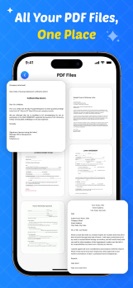


Remove Handwriting is a document-cleaning utility for iOS that uses AI to erase pen marks from scanned forms and notes.
The App DNA
What makes this app unique?
It removes the time-consuming friction of manually re-typing or re-scanning documents when only minor handwritten annotations need to be cleared.
For Students, teachers, and professionals who need to clean, edit, and digitize handwritten forms or study notes.
What does it look like?
Key features
Automated detection and erasure of pen marks while maintaining document structure.
Camera-based capture with auto-crop and perspective correction.
Local data handling for sensitive documents without server-side storage.
How much does it cost?
The freemium model gates advanced editing and ad-free usage behind a subscription.
Velocity
Maintenance developmentperformanceopaqueShow more...
The app is currently in a maintenance phase, with only one minor release shipped in the last 83 days. Development activity is limited to generic stability and bug-solving improvements, with no evidence of new features or live-service content. The current cadence suggests a focus on basic upkeep rather than active product expansion. Future updates are expected to remain infrequent given the current development trend.
Who built it?
Bhakti Dave
6 apps tracked · Productivity
 Lightning on Map : LR Tracker
 FitShape : Body & Curve Editor
 Hair Filter AI : Cut & Color
 MimicMotion Human Motion Video
 AI Chat with PDF : Remove Ink
User Sentiment
What do users think recently?
How are ratings & reviews evolving?
Not enough recent reviews to extract reliable themes yet.
Read the full review analysisCompetition
Competitive landscape for Remove Handwriting
How's the Productivity market?
Remove Handwriting holds a 2.5-star rating across 9 reviews on iOS. The lack of recent feature updates suggests a low-priority position within the productivity category.
The rivals identified
The Analyst's Read
Key takeaways for Remove Handwriting
Where is it heading?
The productivity document-scanning market is consolidating around apps with frequent OCR and AI-editing updates. Remove Handwriting's lack of recent feature investment leaves it exposed to churn, as users migrate to more reliable, actively maintained alternatives.
- The 83-day update gap indicates a lack of active feature development, which erodes user trust and long-term retention.
The SWOT
- On-device processing provides a privacy-first barrier for sensitive documents
- Localized pricing could capture users currently deterred by the premium-only gate
Next best moves
Audit UX flows because the 2.5-star rating suggests critical friction points → improve rating baseline
The counter-intuitive read
The app's maintenance-only state is a strategic liability…
Read the full takeSince the last report: The outlook for Remove Handwriting has shifted from stable to declining due to prolonged development stagnation and persistent user dissatisfaction. The focus has moved from feature expansion to addressing critical UX friction points.
Bottom line
Transitioning to a more aggressive feature-update cycle is necessary to address the low user satisfaction, as the current maintenance-only posture risks total loss of the user base to more active document-scanning rivals.
Unlock 1 critical friction, 1 market threat and the analyst’s take.
Access the full report for freeFAQ
Is Remove Handwriting free to use?
Does Remove Handwriting work offline?
What are the alternatives to Remove Handwriting?
Sources
Report last updated