


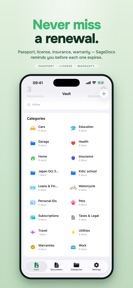

SageDocs is a secure document vault for iPhone, iPad, and Mac that uses local encryption to store and track sensitive personal files.
The App DNA
What makes this app unique?
Users hire SageDocs to remove the cognitive friction of tracking document expirations and the security risk of storing sensitive IDs in unencrypted cloud notes.
For Apple users seeking a local-first, private vault for sensitive personal documents and expiry tracking.
What does it look like?
Key features
Attachments are encrypted locally using Apple's CryptoKit before storage or sync, reinforcing a privacy-first barrier.
Automated notifications for document deadlines create a recurring utility loop that keeps the app relevant.
End-to-end encrypted synchronization across Apple devices increases the value of the subscription.
How much does it cost?
The subscription model is anchored at $2.99/month, positioning SageDocs as a privacy-focused utility without ad-supported tiers.
Velocity
Maintenance developmentperformanceUX improvementsShow more...
The app maintains a maintenance-tier cadence, shipping only one release in the observed window. With the latest update occurring 45 days ago, development is focused exclusively on stability and performance rather than new content or features. The current release cycle suggests a stable, low-frequency maintenance pattern.
Who built it?
User Sentiment
What do users think recently?
How are ratings & reviews evolving?
Not enough recent reviews to extract reliable themes yet.
Read the full review analysisCompetition
Competitive landscape for SageDocs: Secure Document Safe
How's the Utilities market?
SageDocs competes in the privacy-utility space, where its subscription-only model differentiates it from ad-supported document managers. The lack of a high-volume free tier limits broad market penetration, focusing the user base on high-intent individuals who value local-first security over free access.
Read the market outlookThe rivals identified
Unlock the deeper market read.
Access the full report for freeThe Analyst's Read
Key takeaways for SageDocs: Secure Document Safe
Where is it heading?
The document-safe category is consolidating around native platform tools like Apple Notes and Wallet, which reduces the need for third-party apps. SageDocs must pivot to a freemium model to maintain relevance, or it risks being relegated to a niche utility for power users.
- The maintenance-only release cadence indicates a stable, low-cost operation rather than a growth-oriented expansion phase.
- Subscription-only pricing limits user acquisition in a category where free, ad-supported alternatives are common.
The SWOT
- Local-first encryption via Apple's CryptoKit creates a privacy-first barrier.
- Automated expiry reminders create a recurring utility loop.
- Implementing a limited free-tier could widen top-of-funnel conversion.
Next best moves
Implement a limited free-tier because the current subscription-only model limits top-of-funnel growth → increase user acquisition
The counter-intuitive read
The privacy-first, local-only design is a retention lever for security-conscious users…
Read the full takeSince the last report: Strategic positioning has shifted from a general privacy-first stance to a defensive posture against native Apple utilities. The product roadmap now prioritizes a freemium pivot to address user acquisition barriers.
Bottom line
SageDocs relies on privacy-first encryption to defend its niche, but the subscription-only model restricts growth in a market where users expect free entry. Pivoting to a limited free-tier would unlock the top-of-funnel volume needed to compete with native Apple utilities.
Unlock 2 critical frictions, 1 market threat and the analyst’s take.
Access the full report for freeFAQ
Is SageDocs free to use?
How does SageDocs protect my documents?
Can I use SageDocs on my Mac and iPhone?
Sources
- [1] App Store, source
Report last updated