


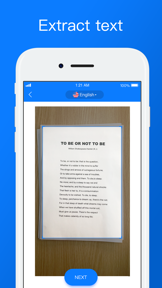
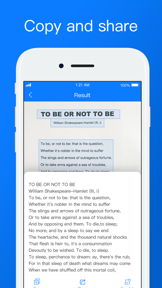
Scanner App-PDF Documents Scan is a productivity tool for iOS that extracts text from images and screenshots using OCR.
The App DNA
What makes this app unique?
It removes the manual effort of typing from physical documents, though the current network-dependent architecture forces users to maintain connectivity for basic tasks.
For Users requiring text digitization from documents or screenshots for productivity workflows.
What does it look like?
Key features
Optical character recognition converts text from images into editable, copyable formats.
Recognizes text across 10+ languages from uploaded images.
Processes text directly from device screenshots.
How much does it cost?
Subscription-only model anchored at $9.99 monthly, utilizing a 3-day free trial to initiate the billing cycle.
Velocity
Dormant developmentopaqueShow more...
The app has reached a zombie state, with no updates or feature releases in 1,865 days. Development activity has ceased entirely, and there is no evidence of ongoing maintenance or support. The last available release provided only minor performance improvements, and the project has remained dormant since.
Who built it?
Voice
7 apps tracked · Productivity
 Followers for Instagram Report
 Música IA:Crea Canciones
 Voice Recorder: AI Note Taker
 AI Garden Design: Makeover
 Voice Translator - Travel
 Heart Rate Monitor: Pulse
User Sentiment
What do users think recently?
Recent user voice shows a frustrated sentiment. Users appreciate the absence of aggressive monetization or subscription paywalls makes the scanning experience feel fair and accessible.
How are ratings & reviews evolving?
What users say, by theme
- The absence of aggressive monetization or subscription paywalls makes the scanning experience feel fair and accessible
- Persistent network connectivity errors prevent the application from functioning for users without an active data connection
2 of 2 recent reviews analyzed · limited sample
Read the full review analysisUnlock 1 user request, each backed by review evidence.
Access the full report for freeCompetition
Competitive landscape for Scanner App-PDF Documents Scan
How's the Productivity market?
Scanner App-PDF Documents Scan maintains a 3.5-star rating across a small sample of 6 total ratings, reflecting a lack of recent development activity. The absence of updates since 2021 positions the app as a legacy utility rather than a competitive productivity solution.
Read the market outlookThe rivals identified
Unlock the deeper market read.
Access the full report for freeThe Analyst's Read
Key takeaways for Scanner App-PDF Documents Scan
Where is it heading?
The productivity scanning market is consolidating around tools that offer offline-first processing and tiered free access. Scanner App-PDF Documents Scan remains exposed due to its network-dependent architecture and lack of recent updates, which will likely accelerate churn as users migrate to more reliable alternatives.
- The five-year development silence indicates the product is in maintenance mode, which prevents the app from competing with modern, frequently updated productivity tools.
The SWOT
- Multi-language OCR library supports 10+ languages.
- Screenshot recognition enables direct text extraction.
- Local-first OCR processing would remove the primary connectivity barrier.
Next best moves
Migrate OCR processing to local device libraries because network dependency is the top complaint → improve retention.
The counter-intuitive read
The app's subscription-only model is a liability not because of the price…
Read the full takeBottom line
Transitioning to local-first OCR processing would address the connectivity failures currently driving negative sentiment, as the current network-dependent architecture is incompatible with mobile-first productivity needs.
Unlock 3 critical frictions, 1 market threat and the analyst’s take.
Access the full report for freeFAQ
Does Scanner App-PDF Documents Scan work without an internet connection?
Is there a free version of this app?
What are some alternatives to this scanner app?
Sources
- [1] App Store, source
Report last updated