



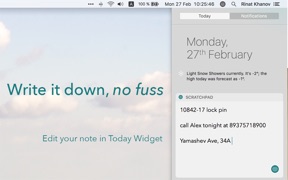
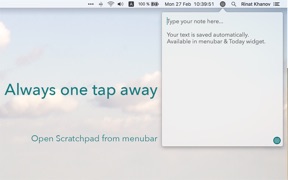

Scratchpad is a minimalist macOS note-taking utility that provides one-click menubar access for rapid text capture.
The App DNA
What makes this app unique?
It removes the cognitive friction of folder management and app switching, serving users who need to jot down information instantly during calls.
For Professionals and individuals who require an immediate, distraction-free space to jot down notes during calls or tasks.
What does it look like?
Key features
Provides instant, one-click access to a note-taking interface from the system menubar or Today widget.
Focuses on speed by removing folders and complex organizational features that can impede quick data entry.
Allows users to transfer captured text to Evernote or the native Notes app for long-term storage.
How much does it cost?
Flat-fee paid model differentiates from the subscription-heavy productivity category.
Velocity
Steady developmentShow more...
Who built it?
Rinat Khanov
7 apps tracked · Productivity
 MeasureKit - AR Ruler Tape
 Swapped - face swap with friends and celebrities
 Symbols - unicode keyboard
 PlanKit - Floor plan creator
 Animals Stickers Pack
 YWC: your work companion
User Sentiment
What do users think recently?
How are ratings & reviews evolving?
Not enough recent reviews to extract reliable themes yet.
Read the full review analysisCompetition
Competitive landscape for Scratchpad - Simple Notes Widget
How's the Productivity market?
Scratchpad operates as a niche productivity utility on macOS, priced at $1.99. The lack of updates for over 3,400 days suggests a maintenance-only posture that limits its ability to compete with modern, cross-platform note-taking suites.
Read the market outlookThe rivals identified
By DroidVeda LLP
This app directly competes for the 'quick capture' use case by offering a high-visibility, widget-based note-taking experience that dominates the productivity category.
- Massive user base of over 22,000 reviews creates a significant social proof and trust barrier.
- Integrated reminder system transforms simple notes into actionable tasks, exceeding this app's passive storage model.
- Frequent updates and long-term market presence provide a stable, reliable experience for casual note-takers.
 Memo Pad @ ANIMAL LIFE +WidgetContender
 FiveNotes MobileContender
 Portable OrganizerContender
 AI Note Taker: Voice & VideoContender
Unlock the head-to-head verdict: where this rival wins, and where it loses.
Access the full report for freeThe Analyst's Read
Key takeaways for Scratchpad - Simple Notes Widget
Where is it heading?
The quick-capture productivity market is consolidating around apps that offer cross-platform sync and actionable reminders. Scratchpad's maintenance-only posture leaves it exposed to rivals that provide higher utility, signaling a long-term decline in relevance.
- The 3,400-day update gap indicates a stalled development cycle, which erodes trust and risks compatibility with modern macOS versions.
The SWOT
- One-click menubar access enables faster capture speed than standard note apps.
- Adding a lightweight reminder layer would bridge the utility gap against the nemesis.
Next best moves
Ship a lightweight reminder layer because the nemesis uses reminders to drive daily retention → increase session frequency
The counter-intuitive read
The $1.99 flat-fee model is a liability, not an asset…
Read the full takeFeature gaps
Scheduled reminders (available in Sticky Notes ! but missing here) +1
Since the last report: The assessment of Scratchpad has shifted from a focus on feature-based utility gaps to a more urgent concern regarding the risks of long-term development stagnation and a restrictive pricing model.
Bottom line
The lack of updates for over 3,400 days makes Scratchpad vulnerable to OS-level regressions, and the absence of a reminder layer cedes the quick-capture market to utility-rich rivals.
Unlock 2 critical frictions, 1 market threat and the analyst’s take.
Access the full report for freeFAQ
Is Scratchpad suitable for long-term note storage?
How does Scratchpad compare to Sticky Notes !?
What are some free alternatives to Scratchpad?
Sources
- [1] App Store, source
Report last updated