




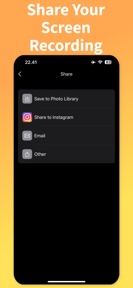
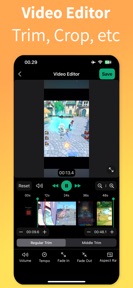
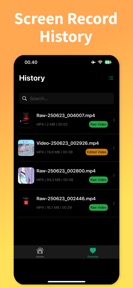
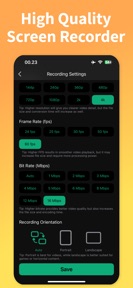
Screen Capture・Game Recorder is an iOS utility for capturing and trimming screen activity, featuring adjustable recording parameters and a built-in editor.
The App DNA
What makes this app unique?
Users open the app to capture gameplay or tutorials, but the lack of clear file-management guidance forces them to abandon the tool when they cannot find their output.
For Mobile users, gamers, and content creators on iOS needing screen capture and basic editing.
What does it look like?
Key features
Adjustable bit rate, frame rate, and resolution settings.
Trimming, volume adjustment, and speed modification tools.
Gated premium feature for branding-free video sharing.
How much does it cost?
The freemium model relies on gating advanced editing and watermark-free exports to drive premium conversions.
Velocity
Dormant developmentperformanceShow more...
The app has not received a feature update or maintenance patch in 253 days. Development momentum is non-existent, as the single release in the observed window provided only generic performance improvements. There is no evidence of active support or ongoing development for this product.
Who built it?
Kartika Ardiani
13+ apps tracked · Photo & Video
 Guitar Tuner - TuneGuide
 Music Alarm
 Violin Tuner - TuneGuide
 Color Identifier・Match Scanner
 Video to Audio Converter ◌
 Level Tool
 Electric Guitar Tuner ™
 Loan Calculator - LoanPlan
 Word Count ™
 RAR Extractor・Unrar・Unarchiver
 Q R Code Reader Scan ™
 Sleep Timer・Turn Off Music
User Sentiment
What do users think recently?
The recent review mood reads upset.
How are ratings & reviews evolving?
What users say, by theme
- Users report: Users cannot locate saved video recordings within the interface after completing a capture session
1 of 1 recent reviews analyzed · limited sample
Read the full review analysisUnlock 1 more frustration theme and 1 user request, each backed by review evidence.
Access the full report for freeCompetition
Competitive landscape for Screen Capture・Game Recorder
How's the Photo & Video market?
Screen Capture・Game Recorder holds a 4.4-star rating across 30 total ratings, reflecting a small but polarized user base. The lack of updates for over eight months signals a maintenance-only posture that limits competitive growth in the video utility category.
Read the market outlookThe rivals identified
Unlock the deeper market read.
Access the full report for freeThe Analyst's Read
Key takeaways for Screen Capture・Game Recorder
Where is it heading?
The video utility market is consolidating around apps that offer frequent UI refinements and clear user guidance. Screen Capture・Game Recorder remains in a maintenance state, which leaves it exposed to more active rivals that can better support their user base.
- The eight-month update silence indicates a maintenance-only posture, which leaves the app unable to address critical usability complaints regarding file management.
- User confusion over file storage locations creates a high-friction experience that prevents the app from building a loyal, recurring user base.
The SWOT
- Adjustable recording parameters provide a functional baseline for creators
- Adding a simple file-management tutorial would resolve the primary user complaint
Next best moves
Ship a one-screen onboarding tutorial because users cannot find saved files → reduce churn
The counter-intuitive read
The app's primary risk is not a lack of features…
Read the full takeSince the last report: The product remains in a stagnant state with no functional or strategic changes observed. The critical usability failure regarding file-path visibility persists, and the development cadence remains at zero activity for over eight months.
Bottom line
Screen Capture・Game Recorder must implement a basic file-location tutorial to address the usability failures that currently drive negative sentiment. Resolving this friction is the only way to stabilize the user base before considering further feature investment.
Unlock 2 critical frictions, 1 market threat and the analyst’s take.
Access the full report for freeFAQ
Where are my video recordings saved?
Is Screen Capture・Game Recorder free to use?
Does this app include a video editor?
Sources
- [1] App Store, source
Report last updated