


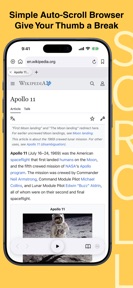



Scroll is a specialized browser for iPhone and iPad that automates page scrolling to facilitate long-form reading.
The App DNA
What makes this app unique?
The app removes the physical friction of constant swiping during long reading sessions, serving users who prioritize content focus over general browsing.
For Users who consume long-form web content on iPhone or iPad and seek to reduce manual swiping.
What does it look like?
Key features
Automated page scrolling with adjustable speed via a central play button.
Bulk saving of images from webpages for offline viewing.
Importing bookmarks from Safari with duplicate detection.
How much does it cost?
Scroll is distributed as a free utility with no visible subscription or IAP gates.
Velocity
Active developmentUX improvementsShow more...
The developer maintains an active release cadence, shipping approximately 0.67 releases per week based on the current window. The latest release focuses on UX improvements by providing users with more granular control over scroll speed. Development appears stable, with the most recent update arriving just three days ago. The team is actively iterating on core functionality rather than relying on server-side flags or opaque maintenance cycles.
Who built it?

User Sentiment
What do users think recently?
Review voice lately leans thrilled. Users appreciate adjustable scroll speed settings allow users to customize their reading experience for lyrics and tabs and clean artificial intelligence implementation provides a smooth visual experience without choppy playback or stuttering.
How are ratings & reviews evolving?
What users say, by theme
- Adjustable scroll speed settings allow users to customize their reading experience for lyrics and tabs
- Clean artificial intelligence implementation provides a smooth visual experience without choppy playback or stuttering
2 of 2 recent reviews analyzed · limited sample
Read the full review analysisCompetition
Competitive landscape for Scroll - Auto Scroll Browser
How's the Utilities market?
Scroll operates in the Utilities category with a 5-star rating across a small sample of 3 ratings. The lack of monetization gates suggests a focus on user acquisition and utility-driven retention over immediate revenue.
Read the market outlookThe rivals identified
Unlock the deeper market read.
Access the full report for freeThe Analyst's Read
Key takeaways for Scroll - Auto Scroll Browser
Where is it heading?
The browser market for niche reading utilities is shifting toward high-performance, distraction-free experiences. Scroll is well-positioned to capture this segment if it continues to iterate on its core auto-scroll utility.
- The latest release refined scroll speed adjustment, which aligns with user feedback regarding the need for finer control when scrolling at different speeds.
The SWOT
- Adjustable scroll speed mechanism creates a distinct utility advantage.
- Offline image library enables content consumption without network dependency.
- Safari bookmark integration provides a low-friction acquisition path.
Next best moves
Ship cloud-sync for bookmarks because current manual import is a friction point for multi-device users → increase retention
The counter-intuitive read
Scroll's narrow focus on auto-scrolling is a strength, not a limitation…
Read the full takeBottom line
Refining the scroll speed control has successfully addressed the primary user friction point, establishing a clear utility for long-form readers. Prioritizing cross-device bookmark synchronization would now unlock the next phase of retention by reducing the switching cost for power users.
Unlock 1 critical friction, 1 market threat and the analyst’s take.
Access the full report for freeFAQ
Is Scroll better than Safari for reading long articles?
Does Scroll work without an internet connection?
Is Scroll free to use?
Sources
- [1] App Store, source
Report last updated