


Sheets - Excel Editor


Sheets - Excel Editor is a mobile spreadsheet tool for iOS that allows users to create, import, and edit Excel workbooks with AI-assisted formula suggestions.
The App DNA
What makes this app unique?
The app removes the friction of complex spreadsheet management on mobile devices by providing predefined templates and automated formula troubleshooting.
For Individuals and professionals needing mobile-based spreadsheet creation, editing, and financial tracking tools.
What does it look like?
Key features
Provides formula suggestions and troubleshooting assistance for spreadsheet data analysis.
Supports creation, import, and favoriting of .xlsx files.
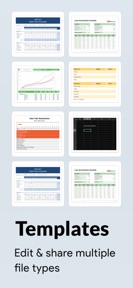
Includes templates for financial planning, project management, and inventory tracking.
How much does it cost?
The subscription model relies on auto-renewing payments with a 24-hour cancellation window, gating advanced AI features to drive conversion.
Velocity
Maintenance developmentperformanceopaqueShow more...
The app maintains a maintenance-level cadence, with only one release identified in the recent window. The latest version focuses exclusively on performance and stability, providing no new features or content. Development appears to be in a steady maintenance phase, with no indication of active feature expansion or live operations. The current release frequency of approximately one update every five to six weeks suggests a focus on basic upkeep rather than growth.
Who built it?
Neon Infotech FZ-
9 apps tracked · Productivity
 Word Document
 Spreadsheet - XLSX Sheets
 Two Player Games (Duo Fun)
 Bus Simulator : Drive
 Tasks: Task Planner & Reminder
 SafeDocs: Document Manager
 Casino Vegas
 Translator Go - Live Translate
User Sentiment
What do users think recently?
How are ratings & reviews evolving?
Not enough recent reviews to extract reliable themes yet.
Read the full review analysisCompetition
Competitive landscape for Sheets - Excel Editor
How's the Productivity market?
Sheets - Excel Editor operates in the productivity space, currently holding a #93 Grossing position in its category. The lack of a high-volume free user base suggests the subscription-first model faces significant conversion challenges against established productivity suites.
The rivals identified
The Analyst's Read
Key takeaways for Sheets - Excel Editor
Where is it heading?
The mobile productivity market is consolidating around suites that offer cross-device synchronization and collaborative features. Sheets - Excel Editor remains exposed to churn because its current feature set lacks the data portability required for professional workflows.
- The 38-day maintenance cadence indicates a focus on stability over feature expansion, which limits competitive growth in the productivity category.
The SWOT
- AI-powered formula suggestions provide utility for troubleshooting complex spreadsheet issues.
- Localized templates for niche professional segments could capture underserved users.
Next best moves
Ship cloud-syncing capabilities because it is a standard expectation for productivity tools → improve retention
The counter-intuitive read
The reliance on AI formula suggestions is a distraction…
Read the full takeSince the last report: The app's competitive narrative shifted from promoting AI-powered formula assistance to addressing the absence of cloud-syncing as a critical barrier to professional adoption. This pivot reflects a defensive adjustment in response to market consolidation around collaborative productivity suites.
Bottom line
Sheets - Excel Editor must address the lack of cloud-syncing to remain viable against established productivity suites, as mobile-only editing without data portability limits its long-term utility for professional users.
Unlock 1 critical friction, 1 market threat and the analyst’s take.
Access the full report for freeFAQ
Is Sheets - Excel Editor free to use?
Does Sheets - Excel Editor support cloud syncing?
What are the main alternatives to Sheets - Excel Editor?
Sources
- [1] App Store
Report last updated