


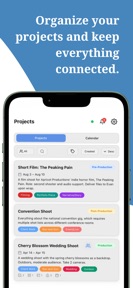




Shoot Manager is a production planning app for photographers and videographers, structured around project-based shot lists and gear inventory management on iOS.
The App DNA
What makes this app unique?
The platform removes the cognitive load of managing disparate production assets by linking mood boards, gear loadouts, and set layouts within a single project file.
For Photographers, videographers, and visual creatives managing complex production workflows and equipment inventories.
What does it look like?
Key features
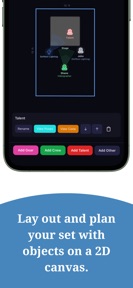
Visual planning tool for set layouts; functions as a premium-tier gate for professional production planning.
Automated ingestion of shot lists; reduces manual entry friction for high-volume production planning.
Real-time sharing for up to 5 team members; acts as a B2B-style distribution barrier.
How much does it cost?
Subscription model anchored at $14.99/month, with a 33% discount incentive for annual commitments.
Velocity
Maintenance developmentUX improvementsShow more...
The app ships at a maintenance cadence, with only one release recorded in the recent window. Development activity is currently limited to minor refinements rather than significant feature expansion. The latest version includes updates to store imagery and internal settings, reflecting a focus on polish rather than new functionality. At 21 days since the last update, the development pace remains slow and steady.
Who built it?
User Sentiment
What do users think recently?
How are ratings & reviews evolving?
Not enough recent reviews to extract reliable themes yet.
Read the full review analysisCompetition
Competitive landscape for Shoot Manager - Shot Lists
How's the Photo & Video market?
Shoot Manager occupies a niche in the Photo & Video category, focusing on production logistics rather than image editing. The $14.99/month price point positions the app as a professional utility, requiring high user retention to justify the cost against free spreadsheet alternatives.
Read the market outlookThe rivals identified
Unlock the deeper market read.
Access the full report for freeThe Analyst's Read
Key takeaways for Shoot Manager - Shot Lists
Where is it heading?
The production planning market is shifting toward integrated, cloud-first workflows that allow for real-time team coordination. Shoot Manager remains in a maintenance posture, which leaves the collaboration feature set vulnerable to competitors that offer seamless cross-device synchronization.
- The latest release focuses on minor store asset adjustments, indicating a maintenance-mode cadence rather than aggressive feature expansion.
- The absence of cloud-sync functionality creates a friction point for professional teams, which may drive churn toward more integrated project management platforms.
The SWOT
- 2D Studio canvas enables visual set planning that replaces fragmented sketching tools
- OCR and voice ingestion reduce manual data entry friction for high-volume production planning
- Integration with industry-standard cloud storage could solve the current local-only storage limitation
- Template library expansion could increase the value proposition for recurring production workflows
Next best moves
Ship cloud-sync support because local-only storage limits team collaboration → increase retention
The counter-intuitive read
The local-only storage model is a liability for team collaboration…
Read the full takeSince the last report: The developer has pivoted from positioning local-only storage as a core strength to identifying it as a primary weakness and a barrier to professional team adoption. This shift is reflected in updated product priorities that now target cloud-sync development.
Bottom line
Shoot Manager provides a specialized planning utility that replaces manual spreadsheets, but the local-only storage model limits its effectiveness for professional teams. Prioritizing cloud synchronization would unlock the full value of the collaboration features and justify the premium subscription cost.
Unlock 2 critical frictions, 2 market threats and the analyst’s take.
Access the full report for freeFAQ
Is Shoot Manager suitable for professional production teams?
Does Shoot Manager work without an internet connection?
What is the difference between the free and Pro versions?
Sources
- [1] App Store, source
Report last updated