


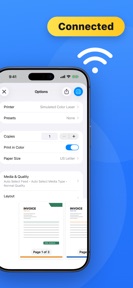

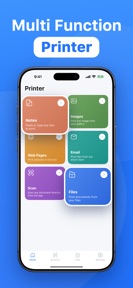
Smart Printer – Print & Scan is a mobile utility for iPhone that enables wireless printing and document scanning.
The App DNA
What makes this app unique?
The app removes the technical friction of driver installation for users needing to print or digitize documents from cloud storage or email attachments.
For iPhone users requiring mobile document management and wireless printing for personal or professional tasks.
What does it look like?
Key features
Direct printing to 10,000+ printer models without driver installation.
Camera-based document capture for receipts and contracts.
Direct printing of PDF, Word, and Excel files.
How much does it cost?
Subscription-only model gates all core utility features, creating a high barrier for casual users.
Velocity
Maintenance developmentperformanceopaqueShow more...
Smart Printer – Print & Scan maintains a maintenance-level cadence, with only one release shipped in the last 29 days. The development trend is stable but limited to minor stability and performance improvements. The publisher provides no visibility into specific feature development, as the latest release notes are generic and opaque. There is no evidence of live operations or new content cycles.
Who built it?
MERAL KUTUKCU
3 apps tracked · Productivity
 Spåra Paket - Parqo
 Followers Reports : Insightly
User Sentiment
What do users think recently?
How are ratings & reviews evolving?
Not enough recent reviews to extract reliable themes yet.
Read the full review analysisCompetition
Competitive landscape for Smart Printer – Print & Scan
How's the Productivity market?
Smart Printer – Print & Scan competes in the productivity category as a premium-priced utility, with its $9.99 weekly subscription tier significantly exceeding the median cost for similar mobile printing tools.
The rivals identified
The Analyst's Read
Key takeaways for Smart Printer – Print & Scan
Where is it heading?
The mobile printing market is consolidating around integrated OS utilities, leaving third-party apps like Smart Printer – Print & Scan exposed. Without active feature investment, the app risks churn as users shift to free, built-in alternatives.
- The 29-day update cadence indicates a maintenance-only posture, which limits the ability to respond to competitive pressure from native OS tools.
The SWOT
- Driverless Wi-Fi connectivity across 10,000+ models
- Localized pricing in high-ARPU markets
Next best moves
Introduce a limited free tier because the current subscription-only model creates a high barrier to entry → increase top-of-funnel conversion.
The counter-intuitive read
The app's high weekly subscription price may be…
Read the full takeBottom line
The subscription-only model limits the user base to power users, while the lack of recent feature updates leaves the app vulnerable to platform-native scanning tools.
Unlock 1 critical friction, 1 market threat and the analyst’s take.
Access the full report for freeFAQ
Is Smart Printer – Print & Scan free to use?
Does Smart Printer – Print & Scan work with my printer?
What happens if I cancel my subscription?
Sources
- [1] App Store, source
Report last updated