


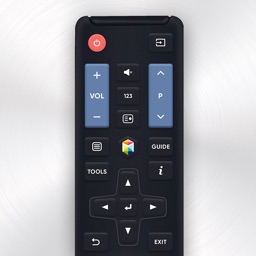


Smart TVs Remote is a utility application for iPhone and iPad that enables mobile control and media casting for Samsung smart televisions.
The App DNA
What makes this app unique?
The app removes the need for physical remotes by providing a digital interface, serving users who prefer a single-brand, lightweight control solution over cluttered universal alternatives.
For Samsung smart TV owners using iPhone or iPad devices who require a mobile-based remote control solution.
What does it look like?
Key features
Enables direct control of Samsung smart TVs when connected to the same Wi-Fi network.
Provides a touchpad interface to simplify menu navigation and interaction.
Allows users to launch their favorite apps and channels directly from the mobile interface.
Supports the casting of photos and videos from the mobile device to the television.
How much does it cost?
The app is currently offered as a free utility, positioning it as a low-barrier entry for Samsung TV owners.
Velocity
Steady developmentShow more...
Who built it?
Tripti Kumari
13+ apps tracked · Productivity
 Cat Translator
 Remote for Fire TV - FireStick
 How Old Do I Look
 Dog Translator: DogTalk Game
 Screen Mirroring: Cast SmartTV
 Santa Call
 Roki: Remote for Roku TV
 Voice Changer - Voice Recorder
 Bubble Level®
 Would You Rather Party Games
 Keyboard Fonts: Keyboard Maker
 Color Widgets - Custom Widgets
User Sentiment
What do users think recently?
How are ratings & reviews evolving?
Not enough recent reviews to extract reliable themes yet.
Read the full review analysisCompetition
Competitive landscape for Smart TVs Remote
How's the Productivity market?
Smart TVs Remote occupies a niche utility space for Samsung hardware, relying on brand-specific protocol focus to differentiate from universal remote apps.
The rivals identified

By ZipoApps
FireApp competes directly for the same living room utility market by providing a universal remote interface for smart TVs, directly challenging this app's niche Samsung-only focus.
- Includes a virtual touchpad and integrated keyboard, offering superior navigation compared to basic directional buttons.
- Features automatic device discovery, significantly reducing the setup friction found in manual network-based pairing apps.
- Maintains a high release cadence with recent updates, ensuring compatibility with evolving smart TV firmware versions.
Unlock the head-to-head verdict: where this rival wins, and where it loses.
Access the full report for freeThe Analyst's Read
Key takeaways for Smart TVs Remote
Where is it heading?
The utility remote market is consolidating around apps that offer universal compatibility and automated setup. Smart TVs Remote remains stable but exposed, as its manual-pairing requirement will likely lead to increased churn if competitors continue to improve their discovery logic.
- The lack of recent updates suggests a maintenance-mode cadence, which leaves the app vulnerable to rivals with faster feature-release cycles.
The SWOT
- Specialized Samsung protocol implementation ensures reliable command execution
- Integrating automatic device discovery would reduce user setup friction
Next best moves
Ship automatic device discovery because manual pairing is the primary friction point compared to the FireApp nemesis → increase new-user conversion
+ 1 more prioritized moveThe counter-intuitive read
The app's narrow focus on Samsung TVs is a strength, not a weakness…
Read the full takeFeature gaps
Automatic device discovery (available in FireApp but absent here) +1
Since the last report: The report transitioned from a basic utility overview to a competitive intelligence framework, identifying manual pairing as a primary friction point against universal remote rivals. No functional changes to the app occurred, but the analytical depth regarding market position and feature gaps increased.
Bottom line
Prioritizing automatic device discovery would address the primary setup friction that currently drives users toward universal remote rivals, solidifying the app's position as the preferred Samsung-specific controller.
Unlock 1 critical friction, 1 market threat, 1 more prioritized move and the analyst’s take.
Access the full report for freeFAQ
Is Smart TVs Remote compatible with non-Samsung TVs?
How does Smart TVs Remote compare to universal remote apps?
Does this app require a specific network setup?
What are some alternatives for controlling multiple TV brands?
Sources
- [1] App Store, source
Report last updated